Expense Claim Review Assistant
Deterministic policy checks on top of accurate receipt extraction mean clean claims are approved without hallucination risk and every rejection comes with a specific, fixable reason.
- For
- Finance team leads at mid-sized professional services firms
- Solves
- Finance staff spend hours each week reading receipts and checking claims against policy by hand.
- Delivers
- Approved claims posted to the accounting system and flagged exceptions with plain-English reasons and correction links
- Built in
- about 5 weeks of creation time, MVP in 5 days
- Investment
- $9,500 for the MVP, $38,500 for the full product
- Run it
- Inside your business, or as part of your offer to clients
What it does
For finance team leads at mid-sized professional services firms, turn receipt photos and forwarded digital receipts into approved claims posted to accounting and flagged exceptions with plain-English reasons.
- Ingest receipts from email, chat and photo upload.
- Extract vendor, date, amount and line items.
- Match each claim to the correct policy version.
- Check amounts, per diems, VAT eligibility and duplicates.
- Return flagged claims with a specific reason and correction path.
- Post approved claims to the accounting system.
What goes in, what comes out
- Receipt photos
- Forwarded digital receipts
- The written expense policy
- Accounting system access

AI drafts, people review. Client intake portal and staff exception queue.
- Approved claims posted to the accounting system
- Flagged exceptions with plain-English reasons
- Correction links
How it works
The workflow
- InStart with
Receipt photos, forwarded digital receipts, the written expense policy and accounting system access
- 1
Submit a receipt
- 2
Extract fields
- 3
Classify the expense
- 4
Apply policy rules
- 5
Approve clean claims
- 6
Return flagged claims for correction
- 7
Post approved claims to accounting
- OutFinish with
Approved claims posted to the accounting system and flagged exceptions with plain-English reasons and correction links
AI does the heavy lifting, people stay in charge
Use OCR plus a language model to extract vendor, date, amount and line items from receipts, and a deterministic rules engine to apply policy checks. A finance team member reviews any flagged or ambiguous claim before it is returned or approved, and unreadable receipts are handed to a human rather than guessed.
What your team sees
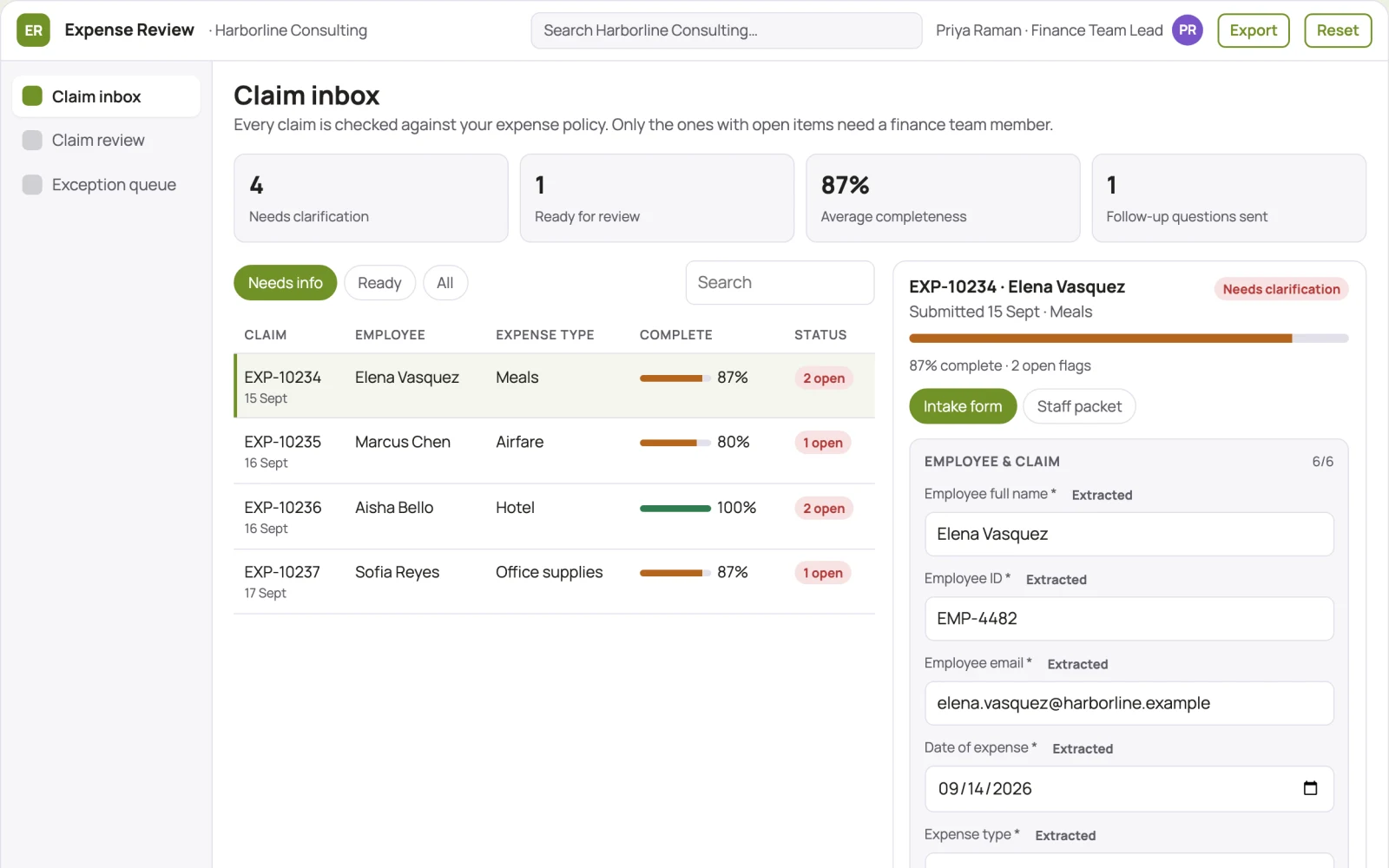
Key screens: Claim inbox, claim review, exception queue. Use a list view of incoming claims with status badges, a detail view showing extracted fields alongside the receipt image and policy rule results, and a queue showing only flagged items with reasons and one-click correction links. Approved claims show a silent audit trail. In this product, the first view is claim inbox, followed by claim review and exception queue.
Accounts and administration
User accounts and roles, policy version history, approval states, exception handling records, duplicate detection logs and a full audit trail per claim.
Integrations and data access
Start with email ingestion and one accounting package such as Xero or QuickBooks, then chat channels and HR systems for employee records.
How we build it
We build with our own AI software development factory, so most implementations take days to a few weeks of creation time, not months. You see working software at every step, and exact timing depends on availability.
- 1
Scoping call
Day 1Thirty minutes on your process, your data and how you want to run it: for your own team, or for your clients. You get a fixed scope and price for the MVP.
- 2
MVP
5 daysOne buyer segment, one recurring use case. Manual review in the loop. Built by our AI software factory.
- 3
Paid pilot
6 daysAccounts, roles, review states, audit trail and the first integration, hardened for two to three paying pilot customers.
- 4
Full product
2 weeksSelf-serve onboarding, billing, monitoring and the wider integration set.
- 5
Run and improve
MonthlyWe host, monitor and improve it for a fixed monthly fee, or hand it over to your team. How the retainer works.
Why we start with an MVP
An MVP, or minimum viable product, is the smallest version that your users can actually work with. It is not a cheap version of the full solution. It is a test, built to answer the questions that decide whether the rest is worth building.
- Pick the riskiest assumption. Here: will finance team leads at mid-sized professional services firms use it to solve "finance staff spend hours each week reading receipts and checking claims against policy by hand"?
- Build only what tests it. One team, one use case, a few core modules. People do the rest by hand for now.
- Run a paid pilot. Run four weeks against the current manual process with a baseline of hours spent checking claims and error rates.
- Measure, then decide. Track finance hours saved per week and percentage of claims approved without human touch. Then expand, change course or stop, with evidence instead of opinions.
MVP scope for this solution. One finance team at a mid-sized firm, expense claim checking for the top five expense types, with receipt ingestion and field extraction modules and human review of every flagged claim.
After the MVP. Automate posting to accounting, duplicate detection across months, VAT eligibility rules, per diem handling and monthly reporting on claim patterns.
What the build depends on. OCR and language model APIs, a deterministic rules engine, email parsing and accounting system APIs.
Investment
A planning range to start the conversation, not a quote. You pay per phase, so you can stop after the MVP.
- Phase 1
MVP
One buyer segment, one recurring use case. Manual review in the loop.
- Phase 2
Paid pilot
Accounts, roles, review states, audit trail and the first integration, hardened for two to three paying pilot customers.
- Phase 3
Full product
Self-serve onboarding, billing, monitoring and the wider integration set.
Indicative total, MVP to full product$38,500about 5 weeks of creation time · start with the MVP from $9,500
Running costs per month
A rough indication of monthly hosting and AI model costs once it is live, not tested. Real costs depend on usage, file sizes and the models chosen.
| Stage | Hosting and infrastructure | AI usage | Total per month |
|---|---|---|---|
| MVP and paid pilotabout 3 customers | $50–$100 | $40–$90 | $90–$190 |
| Full productabout 50 customers | $190–$380 | $280–$560 | $470–$940 |
Run it or resell it
For your own team
Finance team leads at mid-sized professional services firms run it inside the business: receipt photos, forwarded digital receipts, the written expense policy and accounting system access in, approved claims posted to the accounting system and flagged exceptions with plain-English reasons and correction links out, reviewed by your people.
As part of your offer
Agencies, consultancies and software companies can offer it to their own clients under their brand. We build and maintain it; you sell and deliver it.
Your brand, or this one
Run it under your own brand, or start from this concept style.
- primary
#719127 - accent
#7954c9 - surface
#edf1e4 - ink
#22201e
- Headings
- Manrope
- Text
- Manrope
- Voice
- Exact, sober, trustworthy
Selling it to your own clients: the go-to-market playbook
Pricing to test
Fixed monthly fee of 500 to 1,500 USD depending on claim volume, with a 1,000 USD setup fee for policy configuration.
Message to test
Every expense claim checked line by line in seconds, with finance only touching the exceptions.
Where to find buyers
Finance communities and forums, accounting technology newsletters, LinkedIn groups for finance leaders and fractional CFO networks.
Lead magnet
A free two-week review of a sample of recent claims showing what would be flagged and why.
The first 30 days
- Week 1: connect email ingestion and extract fields from sample receipts.
- Week 2: configure policy rules for the top five expense types.
- Week 3: run claims in shadow mode alongside manual checks and compare results.
- Week 4: launch the exception queue and post approved claims to the accounting system.
Paid pilot
Run four weeks against the current manual process with a baseline of hours spent checking claims and error rates. Decision: proceed if the system saves at least 10 hours a week with no increase in wrongly approved claims.
Success metrics
Finance hours saved per week and percentage of claims approved without human touch.
Retention and expansion
The policy rule set, correction history and accounting integration make the system embedded in monthly close, so switching means rebuilding the process.
Why clients would pick it
Each firm's policy rule set and correction history accumulates, making the checks increasingly tailored and accurate over time.
Alternatives and positioning
Teams today check receipts manually in spreadsheets or use generic expense tools with rigid rules; this differs by reading any receipt and explaining every rejection in plain English.
Main delivery costs
OCR and language model processing per receipt, hosting, accounting system connectors and initial policy configuration time.
Safeguards
Ambiguous or unreadable receipts must be handed to a human, never auto-approved. Role-based permissions limit who can approve or edit policy rules, all policy versions are retained, and the system must not post to accounting without a matching approval record.