Fleet Service Orchestrator
The orchestration layer that matches telematics thresholds, garage live calendars and supplier history into a single confirmable card, without requiring any party to change their existing tools.
- For
- Fleet managers at 15 to 80 vehicle light commercial fleets
- Solves
- Fleet managers wait for driver complaints or dashboard lights, then lose days to unplanned downtime because sensor data is never read.
- Delivers
- Confirmed service bookings, parts purchase orders, fleet calendar slots, booking confirmation cards
- Built in
- about 3 weeks of creation time, MVP in 4 days
- Investment
- $7,500 for the MVP, $26,500 for the full product
- Run it
- Inside your business, or as part of your offer to clients
What it does
For fleet managers at 15 to 80 vehicle light commercial fleets, turn telematics usage counters, fault codes and garage calendars into confirmed service bookings with parts orders and a three-day slot in the fleet calendar.
- Ingest telematics usage counters and fault codes hourly.
- Match thresholds against service intervals and ignore transient faults.
- Fetch garage availability via CalDAV or API.
- Rank slots by distance from overnight GPS fix.
- Draft booking request and purchase order.
- Post confirmable card to messaging channel.
What goes in, what comes out
- Telematics API data
- Garage calendar links
- Vehicle service plans
- Supplier purchase history

AI drafts, people review. Operational coordination portal.
- Confirmed service bookings
- Parts purchase orders
- Fleet calendar slots
- Booking confirmation cards
How it works
The workflow
- InStart with
Telematics API data, garage calendar links, vehicle service plans, supplier purchase history
- 1
Connect telematics source
- 2
Sync garage calendars
- 3
Define service thresholds
- 4
Monitor vehicle data
- 5
Trigger on rule match
- 6
Generate booking card
- 7
Finalise on confirmation
- OutFinish with
Confirmed service bookings, parts purchase orders, fleet calendar slots, booking confirmation cards
AI does the heavy lifting, people stay in charge
Use rule-based threshold matching to detect wear and fault patterns, and language models to draft the booking request and part order text. A fleet manager reviews the card and confirms or snoozes before anything is sent to the garage.
What your team sees
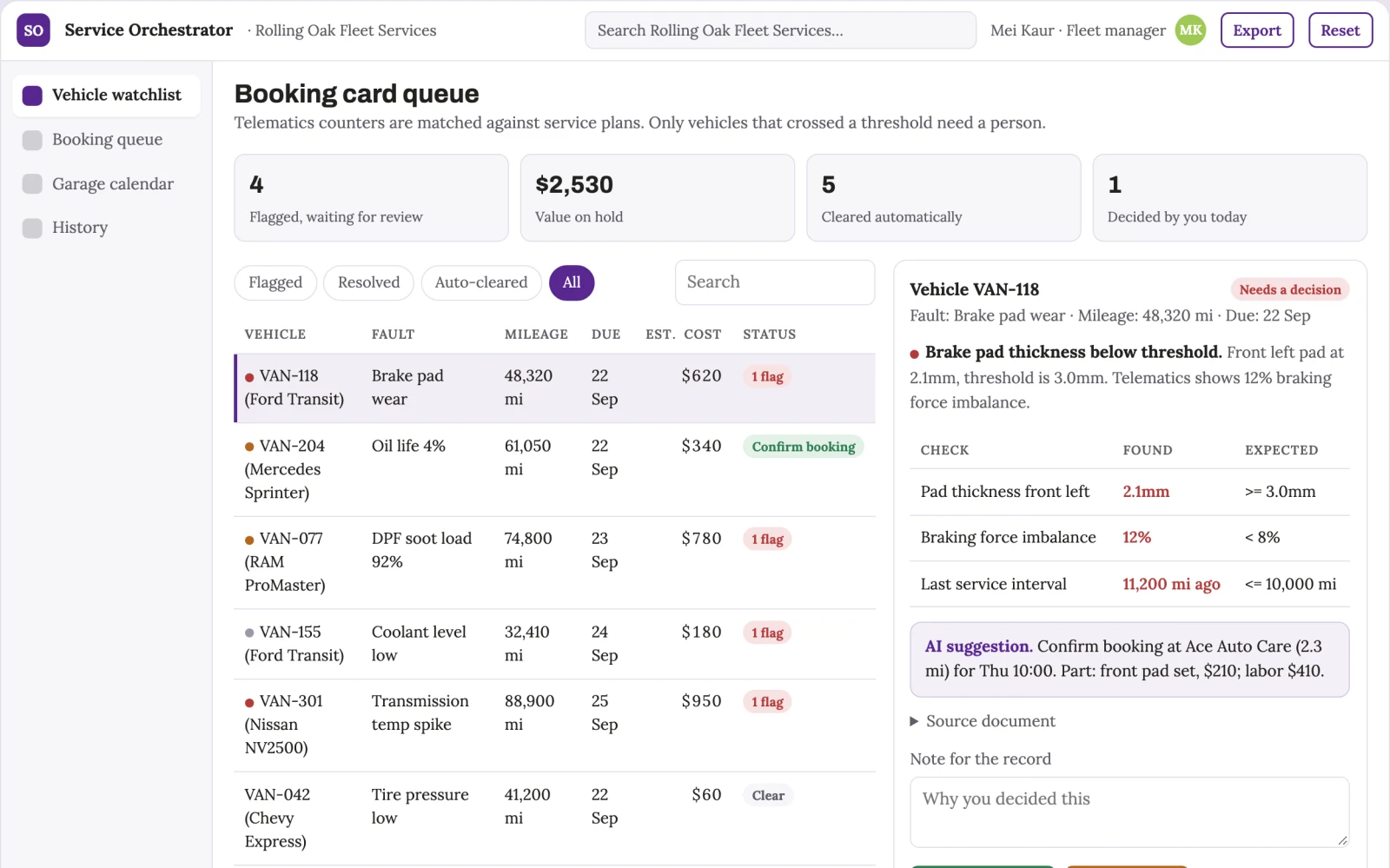
Key screens: Vehicle watchlist, booking card queue, garage calendar view. Use a dashboard of vehicles with status flags, a queue of confirmable booking cards, and a calendar grid showing proposed slots. Let users click a card to see fault details, part number, supplier price and garage distance. Display confirm, snooze and defer actions. Show a history of confirmed bookings and false triggers. In this product, the first view is vehicle watchlist, followed by booking card queue and garage calendar view.
Accounts and administration
Fleet manager accounts, vehicle permissions, booking approval states, audit trail of confirmations and snoozes, supplier and garage records, and a log of all triggered rules and false positives.
Integrations and data access
Telematics APIs, garage CalDAV calendars, messaging platforms like Slack, supplier purchase order systems, and fleet calendar tools.
How we build it
We build with our own AI software development factory, so most implementations take days to a few weeks of creation time, not months. You see working software at every step, and exact timing depends on availability.
- 1
Scoping call
Day 1Thirty minutes on your process, your data and how you want to run it: for your own team, or for your clients. You get a fixed scope and price for the MVP.
- 2
MVP
4 daysOne buyer segment, one recurring use case. Manual review in the loop. Built by our AI software factory.
- 3
Paid pilot
5 daysAccounts, roles, review states, audit trail and the first integration, hardened for two to three paying pilot customers.
- 4
Full product
8 daysSelf-serve onboarding, billing, monitoring and the wider integration set.
- 5
Run and improve
MonthlyWe host, monitor and improve it for a fixed monthly fee, or hand it over to your team. How the retainer works.
Why we start with an MVP
An MVP, or minimum viable product, is the smallest version that your users can actually work with. It is not a cheap version of the full solution. It is a test, built to answer the questions that decide whether the rest is worth building.
- Pick the riskiest assumption. Here: will fleet managers at 15 to 80 vehicle light commercial fleets use it to solve "fleet managers wait for driver complaints or dashboard lights, then lose days to unplanned downtime because sensor data is never read"?
- Build only what tests it. One team, one use case, a few core modules. People do the rest by hand for now.
- Run a paid pilot. Run a paid pilot with one fleet of 10 vans for 8 weeks.
- Measure, then decide. Track reduction in unplanned downtime days per vehicle per month; percentage of booking cards confirmed without manual rework. Then expand, change course or stop, with evidence instead of opinions.
MVP scope for this solution. One vehicle type, one telematics source, one garage calendar, and the confirmable booking card. Cover brake pad wear and one common DTC mapped to a known part. Manual review of every card before sending.
After the MVP. Automate part ordering directly with supplier APIs, add predictive failure models based on usage trends, and expand to multiple garages with automatic rebooking on rejection.
What the build depends on. Reliable telematics API access, garage calendar sync that stays current, and a messaging channel that supports interactive cards.
Investment
A planning range to start the conversation, not a quote. You pay per phase, so you can stop after the MVP.
- Phase 1
MVP
One buyer segment, one recurring use case. Manual review in the loop.
- Phase 2
Paid pilot
Accounts, roles, review states, audit trail and the first integration, hardened for two to three paying pilot customers.
- Phase 3
Full product
Self-serve onboarding, billing, monitoring and the wider integration set.
Indicative total, MVP to full product$26,500about 3 weeks of creation time · start with the MVP from $7,500
Running costs per month
A rough indication of monthly hosting and AI model costs once it is live, not tested. Real costs depend on usage, file sizes and the models chosen.
| Stage | Hosting and infrastructure | AI usage | Total per month |
|---|---|---|---|
| MVP and paid pilotabout 3 customers | $30–$60 | $40–$90 | $70–$150 |
| Full productabout 50 customers | $110–$210 | $280–$560 | $390–$770 |
Run it or resell it
For your own team
Fleet managers at 15 to 80 vehicle light commercial fleets run it inside the business: telematics API data, garage calendar links, vehicle service plans, supplier purchase history in, confirmed service bookings, parts purchase orders, fleet calendar slots, booking confirmation cards out, reviewed by your people.
As part of your offer
Agencies, consultancies and software companies can offer it to their own clients under their brand. We build and maintain it; you sell and deliver it.
Your brand, or this one
Run it under your own brand, or start from this concept style.
- primary
#582791 - accent
#9ec954 - surface
#eae4f1 - ink
#22201e
- Headings
- Archivo
- Text
- Lora
- Voice
- Calm, reliable, step-by-step
Selling it to your own clients: the go-to-market playbook
Pricing to test
Test at $49 per vehicle per month, with a minimum of 10 vehicles, as a hypothesis to validate willingness to pay against avoided downtime.
Message to test
Stop waiting for the dashboard light; let your van book its own service before the driver notices.
Where to find buyers
Fleet management conferences, telematics provider partner programmes, and LinkedIn groups for fleet operators.
Lead magnet
A free one-week demo connecting one vehicle to your garage calendar, showing the first booking card generated from live data.
The first 30 days
- Week 1: Connect one telematics source and stage data.
- Week 2: Build threshold engine for brake wear and one DTC.
- Week 3: Integrate one garage calendar and draft booking card.
- Week 4: Deploy confirmable card to messaging channel and test with two vehicles.
Paid pilot
Run a paid pilot with one fleet of 10 vans for 8 weeks. Baseline current average downtime per service event and admin hours spent. Decision: proceed if confirmed bookings reduce downtime by at least 30% and false triggers stay under 10%.
Success metrics
Reduction in unplanned downtime days per vehicle per month; percentage of booking cards confirmed without manual rework.
Retention and expansion
The system keeps learning vehicle-specific thresholds and garage preferences, so each month the cards get more accurate and the fleet becomes more dependent on the automated loop.
Why clients would pick it
Each connected vehicle and garage adds historical data on false triggers and booking outcomes, making the threshold engine more accurate and the supplier and garage network stickier over time.
Alternatives and positioning
Fleet managers today use manual phone calls, email threads and spreadsheets to track service dates and invoices. This differs by closing the loop from sensor to booking without a human chasing each step.
Main delivery costs
Telematics API integration, garage calendar sync maintenance, cloud hosting, and support for the booking card workflow.
Safeguards
Only authorised fleet managers can confirm bookings. The system must not send anything to a garage without human confirmation. It must not order parts above a set value without a second approval. It must ignore transient faults that clear within a cycle and must not book slots outside agreed working hours.