Hospitality shift recipe change desk
Connect approved recipe changes to specific kitchen stations.
- For
- Multi-site restaurant kitchen managers
- Solves
- Recipe updates do not reach every station and language version.
- Delivers
- Kitchen recipe-change handoff
- Built in
- about 4 weeks of creation time, MVP in 4 days
- Investment
- $12,000 for the MVP, $41,000 for the full product
- Run it
- Inside your business, or as part of your offer to clients
What it does
For multi-site restaurant kitchen managers, turn approved recipe changes and station checklists into kitchen recipe-change handoff.
- Compare recipe versions.
- Identify affected prep tasks.
- Draft station notices.
- Flag translation needs.
- Track supervisor confirmation.
- Export shift brief.
What goes in, what comes out
- Approved recipe changes
- Station checklists

AI drafts, people review. Operational coordination portal.
- Kitchen recipe-change handoff
How it works
The workflow
- InStart with
Approved recipe changes and station checklists
- 1
The buyer creates a project
- 2
Supplies approved recipe changes and station checklists
- 3
Confirms scope and access
- OutFinish with
Kitchen recipe-change handoff
AI does the heavy lifting, people stay in charge
Explain approved changes without inventing ingredient substitutions. Keep model suggestions separate from verified facts. Link factual outputs to authorized input evidence and show missing information explicitly. Use deterministic checks for counts, dates, identifiers and arithmetic where applicable. A designated reviewer validates consequential outputs and signs off the delivered result.
What your team sees
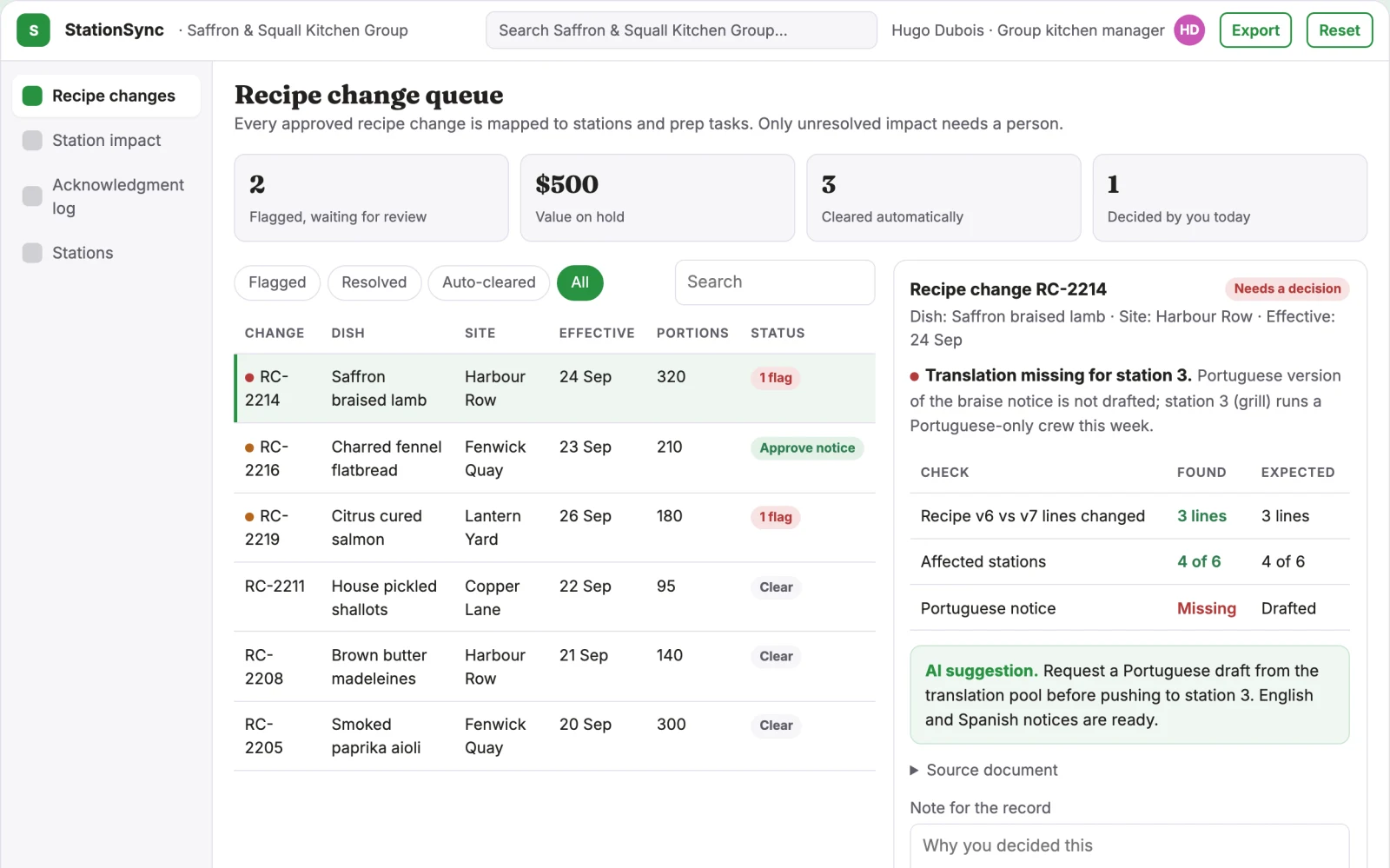
Key screens: Recipe changes, Station impact, Acknowledgment log. Use a queue or timeline as the opening view, with clear owners, dates and current states. Each case opens into its source context, proposed actions and discussion. Give external participants a limited form or status page. Make the next required action visible without opening every record. Open with recipe changes; move into station impact for the detailed task; finish in acknowledgment log for review and handoff. Show the source record, uncertainty and approval status beside each proposed output.
Accounts and administration
Role permissions, task ownership, deadlines, reminders, approval gates, exception handling, action history, duplicate prevention and reversible configuration. Include organization-scoped access, named project owners, review queues, usage limits, export history and retention settings. Never reuse private customer material for other accounts without permission.
Integrations and data access
Property records, event schedules, reservation exports and supplier information. Calendars, email, task managers and relevant business records. Use draft actions and supervised handoffs first, then enable only specifically authorized writes. Begin with uploads and exports of approved recipe changes and station checklists. Any named system or connector is a candidate requiring current access and compatibility checks; no live connection is included by default.
How we build it
We build with our own AI software development factory, so most implementations take days to a few weeks of creation time, not months. You see working software at every step, and exact timing depends on availability.
- 1
Scoping call
Day 1Thirty minutes on your process, your data and how you want to run it: for your own team, or for your clients. You get a fixed scope and price for the MVP.
- 2
MVP
4 daysOne buyer segment, one recurring use case; first modules: compare recipe versions; identify affected prep tasks. Manual review in the loop. Built by our AI software factory.
- 3
Paid pilot
5 daysAccounts, roles, review states, audit trail and the first integration, hardened for two to three paying pilot customers.
- 4
Full product
10 daysSelf-serve onboarding, billing, monitoring and the wider integration set.
- 5
Run and improve
MonthlyWe host, monitor and improve it for a fixed monthly fee, or hand it over to your team. How the retainer works.
Why we start with an MVP
An MVP, or minimum viable product, is the smallest version that your users can actually work with. It is not a cheap version of the full solution. It is a test, built to answer the questions that decide whether the rest is worth building.
- Pick the riskiest assumption. Here: will multi-site restaurant kitchen managers use it to solve "recipe updates do not reach every station and language version"?
- Build only what tests it. One team, one use case, a few core modules. People do the rest by hand for now.
- Run a paid pilot. Agree the acceptance criteria, input limits and reviewer responsibilities before starting.
- Measure, then decide. Track outdated prep instructions and acknowledgment time. Then expand, change course or stop, with evidence instead of opinions.
MVP scope for this solution. Costed pilot: One kitchen; food safety decisions remain with qualified staff. Start with one buyer organization and a bounded set of representative inputs. Implement the first two modules: compare recipe versions; identify affected prep tasks. Support the third task through an assisted review queue: draft station notices. Handle the remaining required functions manually until validated. Include input upload, source references, user correction, a reviewer approval step and export of kitchen recipe-change handoff. Authentication, account isolation, deletion controls and basic operational logging are included. Specialized production certification, live write integrations and broader rollout are not included unless explicitly stated.
After the MVP. After paying customers repeatedly accept kitchen recipe-change handoff, automate flag translation needs; track supervisor confirmation; export shift brief. Add one tested read integration, reusable customer configuration and scheduled repeat delivery. Increase supported formats or teams only when evaluation cases and reviewer capacity cover the new scope. One kitchen; food safety decisions remain with qualified staff.
What the build depends on. Explicit state definitions, owner mapping, approval rules, idempotent actions, notifications and recovery procedures. Workflow reliability matters more than fluent text. Obtain representative authorized inputs, an agreed review rubric and a buyer-side owner. Specific scope: One kitchen; food safety decisions remain with qualified staff.
Investment
A planning range to start the conversation, not a quote. You pay per phase, so you can stop after the MVP.
- Phase 1
MVP
One buyer segment, one recurring use case; first modules: compare recipe versions; identify affected prep tasks. Manual review in the loop.
- Phase 2
Paid pilot
Accounts, roles, review states, audit trail and the first integration, hardened for two to three paying pilot customers.
- Phase 3
Full product
Self-serve onboarding, billing, monitoring and the wider integration set.
Indicative total, MVP to full product$41,000about 4 weeks of creation time · start with the MVP from $12,000
Running costs per month
A rough indication of monthly hosting and AI model costs once it is live, not tested. Real costs depend on usage, file sizes and the models chosen.
| Stage | Hosting and infrastructure | AI usage | Total per month |
|---|---|---|---|
| MVP and paid pilotabout 3 customers | $30–$60 | $40–$90 | $70–$150 |
| Full productabout 50 customers | $110–$210 | $280–$560 | $390–$770 |
Run it or resell it
For your own team
Multi-site restaurant kitchen managers run it inside the business: approved recipe changes and station checklists in, kitchen recipe-change handoff out, reviewed by your people.
As part of your offer
Agencies, consultancies and software companies can offer it to their own clients under their brand. We build and maintain it; you sell and deliver it.
Your brand, or this one
Run it under your own brand, or start from this concept style.
- primary
#279141 - accent
#c954b4 - surface
#e4f1e8 - ink
#22201e
- Headings
- Fraunces
- Text
- Inter
- Voice
- Welcoming, lively, attentive
Selling it to your own clients: the go-to-market playbook
Pricing to test
Test USD 750-2,500 setup plus USD 200-800 monthly for one bounded workflow and team. Cap case volume and implementation scope. Larger operational integrations need separate quotes. Prices are hypotheses. For this buyer, package the first sale around roll out one menu update and the defined kitchen recipe-change handoff. Record actual review effort before offering a recurring allowance. The commercial pilot fee is distinct from the platform development budget.
Message to test
Connect approved recipe changes to specific kitchen stations. Demonstrate the result with roll out one menu update for multi-site restaurant kitchen managers. Use a concrete before-and-after example without promising unmeasured savings.
Where to find buyers
Restaurant operations groups and chef trainers
Lead magnet
Roll out one menu update
The first 30 days
- Week 1: interview five prospective buyers from multi-site restaurant kitchen managers and inspect how they handle recipe updates do not reach every station and language version.
- Week 2: prepare roll out one menu update using authorized or synthetic material.
- Week 3: share the demonstration through restaurant operations groups and chef trainers and seek one bounded paid pilot.
- Week 4: measure outdated prep instructions and acknowledgment time, review delivery effort and ask for a repeat purchase. This is a validation schedule, not a promise that the full product can be built in thirty days.
Paid pilot
Agree the acceptance criteria, input limits and reviewer responsibilities before starting. Run roll out one menu update and deliver kitchen recipe-change handoff. Compare outdated prep instructions and acknowledgment time with the buyer's current process on comparable cases; include corrections, missed issues and reviewer time. Seek payment and repeat use. Stop or revise the scope if data access, accuracy or unit economics fail.
Success metrics
Outdated prep instructions and acknowledgment time
Retention and expansion
Build repeat use around kitchen recipe-change handoff. Save approved configurations and review decisions with permission, revisit unresolved exceptions and show progress on outdated prep instructions and acknowledgment time. Offer a recurring volume allowance after repeat demand; expand to adjacent tasks only when the buyer asks and delivery quality remains acceptable.
Why clients would pick it
Customer-specific workflow rules, reliable handoffs, operational history and integrations that make the service part of daily work. For this concept, accumulate permissioned examples and reviewer corrections around connect approved recipe changes to specific kitchen stations. The durable asset is reliable task-specific execution and trusted customer configuration, not access to a general-purpose AI model.
Alternatives and positioning
Shared inboxes, spreadsheets, task boards and existing workflow automation products. Position this concept around connect approved recipe changes to specific kitchen stations. Compare it against the customer's current process on the same representative task. This is proposed differentiation; no exhaustive competitor study or uniqueness claim has been established.
Main delivery costs
Workflow configuration, integration maintenance, model calls, notification delivery, exception support and monitoring. Initial validation additionally budgets for chef review and sample translation. Track model usage, storage, reviewer minutes, exception handling and customer support per accepted deliverable.
Safeguards
Verify property facts, availability and supplier conditions. Staff approve commercial exceptions and consequential booking changes. One kitchen; food safety decisions remain with qualified staff. Require appropriate access and publication approval. Preserve source material, label AI drafts and make corrections traceable. Measure false positives and missed cases alongside speed.