Visual and document capture search library
Reduce search time across case files while keeping every item traceable to its source.
- For
- Legal teams and records managers handling scanned files, screenshots and case documents
- Solves
- Case files, scanned documents and screenshots sit in separate tools, so staff cannot find a specific page, clause or image quickly and cannot prove who saw what.
- Delivers
- A searchable, permissioned library with reviewer-approved tags and audit history
- Built in
- about 6 weeks of creation time, MVP in 7 days
- Investment
- $14,500 for the MVP, $49,500 for the full product
- Run it
- Inside your business, or as part of your offer to clients
What it does
Reduce search time across case files while keeping every item traceable to its source.
- Capture items from a lock screen widget, screenshot import or camera scan.
- Scan physical documents with automatic edge detection.
- Enhance scans with brightness, contrast and filters.
- Batch scan multiple pages in one session.
- Export items as PDF or JPEG.
- Share items by email, cloud service or approved link.
- Search images by description or visual similarity.
- Extract text with OCR for text search.
- Browse visually similar items by colour, texture and shape.
- Index items semantically for meaning-based retrieval.
- Store items on device for quick access.
- Store items in cloud storage without using device space.
- Search screenshots with natural language queries.
- Categorise screenshots automatically by context.
- Extract key details such as dates, names and amounts.
- Sync and back up across devices.
- Keep the interface fast with large collections.
- Prioritise review tasks by deadline and importance.
- Show calendar-linked deadlines for review and retention.
- Track shared project status with real-time updates.
- Send customisable reminders and notifications.
- Report retrieval and review analytics.
- Integrate with calendar and communication apps.
- Compare the reviewed result with the recorded baseline and value assumptions.
- Capture corrections and named-owner approval before consequential use.
- Export a versioned searchable, permissioned library with source references and unresolved questions.
Everything these tools do, in one app
- Quick capture Allows users to quickly add items through methods like a lock screen widget, direct screenshot import, or camera scanning.Found in NeuralBox, TapScanner
- Document scanning Turns physical documents into digital copies using the device's camera.Found in NeuralBox, TapScanner
- Automatic edge detection Automatically detects document edges during scanning to produce high-quality captures.Found in TapScanner
- Image enhancement Provides tools like brightness, contrast, and filters to improve the quality of scanned images.Found in TapScanner
- Batch scanning Enables scanning multiple pages at once in a single session.Found in TapScanner
- File format support Supports saving and exporting scanned documents in multiple formats such as PDF and JPEG.Found in TapScanner
- Easy sharing Offers convenient options to share scanned documents via email, cloud services, or social media.Found in TapScanner
- AI image search Uses AI to search for images based on descriptions or visual similarity.Found in NeuralBox
- OCR text search Extracts text from images using Optical Character Recognition to enable searching by text content.Found in NeuralBox
- Visual similarity browsing Connects similar images by analyzing color, texture, and shape to aid discovery.Found in NeuralBox
- Semantic image indexing Indexes images semantically to improve search and retrieval based on meaning.Found in NeuralBox
- On-device storage Stores images locally on the device to save space and ensure quick access.Found in NeuralBox
- Cloud storage Provides cloud storage options to save images without using device storage.Found in NeuralBox
- AI-powered chat search Allows users to search within screenshots using natural language queries.Found in Shotup AI
- Automatic screenshot categorization Analyzes and organizes screenshots by context without manual input.Found in Shotup AI
- Key information extraction Extracts relevant details from images to enhance searchability and usability.Found in Shotup AI
- Cross-device syncing and backup Syncs screenshots across multiple devices and ensures data is backed up.Found in Shotup AI
- Lightweight and fast interface Provides a user interface optimized for speed and usability, even with large collections.Found in Shotup AI
- Automated task prioritization Prioritizes tasks based on deadlines and importance to help users focus.Found in Organiser
- Smart calendar integration Integrates with calendars to manage schedules seamlessly.Found in Organiser
- Collaborative project tracking Enables teams to track projects with real-time updates.Found in Organiser
- Customizable reminders and notifications Sends reminders and notifications that can be customized to keep users informed.Found in Organiser
- Productivity analytics Provides insights and analytics to monitor productivity trends over time.Found in Organiser
- Intuitive user interface Offers an easy-to-navigate interface for efficient use.Found in Organiser
- Integration with popular apps Integrates with popular calendar and communication apps for seamless workflow.Found in Organiser
What goes in, what comes out
- Camera scans
- Imported documents
- Screenshots
- Permitted cloud files

AI drafts, people review. Searchable structured library and data stewardship console.
- A searchable
- Permissioned library with reviewer-approved tags
- Audit history
How it works
The workflow
- InStart with
Camera scans, imported documents, screenshots and permitted cloud files
- 1
Confirm the buyer's problem and scope
- 2
Collect camera scans
- 3
Imported documents
- 4
Screenshots and permitted cloud files
- 5
Then follow this sequence: 1
- OutFinish with
A searchable, permissioned library with reviewer-approved tags and audit history
AI does the heavy lifting, people stay in charge
Use AI to interpret permitted inputs, suggest structured mappings and generate candidate outputs for the stated capture, extraction and retrieval modules. Use deterministic code for arithmetic, schema validation, hard constraints and reproducible tests. Review source-linked explanations and uncertainty before accepting results. One approved file set and permission model; final legal classification and privilege checks remain with qualified reviewers. A model suggestion is never a verified fact, professional decision or authorization to act.
What your team sees
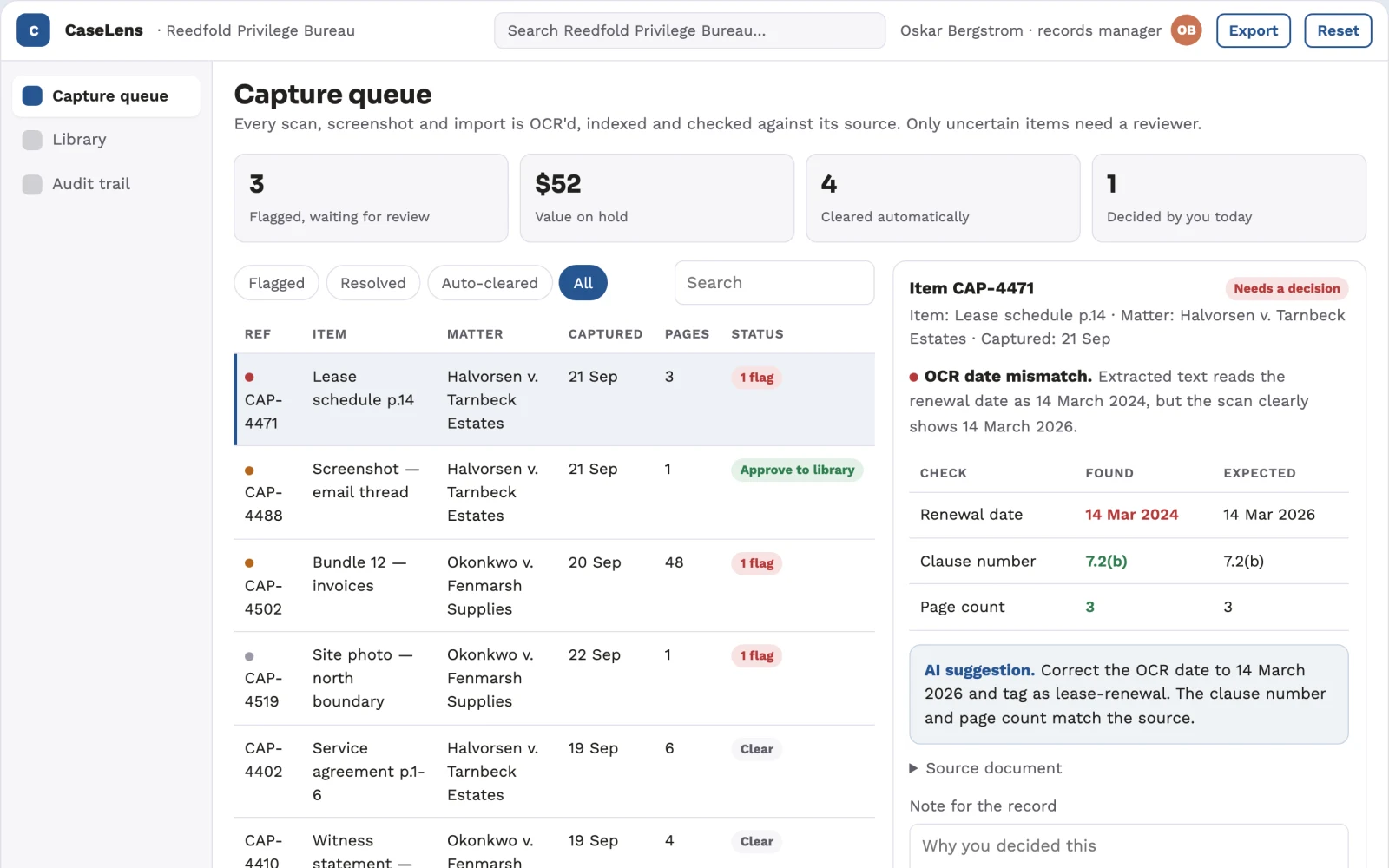
Primary screens: Capture and import, Library search, Item detail and audit. Use a thumbnail and list gallery for collections, a large central viewer for the selected item, and a right-hand panel for extracted text, tags, permissions and comments. Let users compare an original scan with its enhanced version side by side. Display draft, reviewed and approved states. Provide a client or colleague preview link with comments anchored to the relevant page. Make the task-specific outcome a searchable, permissioned library with reviewer-approved tags and audit history visible beside its evidence, review state and value baseline.
Accounts and administration
Project ownership, item versions, client comments, approval states, usage allowances, retention limits, download history and a rights record for supplied material. Add organization access boundaries, named reviewers, usage caps, data retention controls, export logs and explicit approval for external actions.
Integrations and data access
Client-owned case files, authorized scans and permitted cloud sources. Cloud file storage, calendar and communication apps, and document export destinations. Start with file exchange and validate destination specifications before promising direct filing. Start with authorized file exchange. Validate current provider access, usage rights and schema behavior before promising a connector.
How we build it
We build with our own AI software development factory, so most implementations take days to a few weeks of creation time, not months. You see working software at every step, and exact timing depends on availability.
- 1
Scoping call
Day 1Thirty minutes on your process, your data and how you want to run it: for your own team, or for your clients. You get a fixed scope and price for the MVP.
- 2
MVP
7 daysOne buyer segment, one recurring use case; first modules: capture items from a lock screen widget, screenshot import or camera scan; scan physical documents with automatic edge detection; extract text with OCR for text search. Manual review in the loop. Built by our AI software factory.
- 3
Paid pilot
8 daysAccounts, roles, review states, audit trail and the first integration, hardened for two to three paying pilot customers.
- 4
Full product
3 weeksSelf-serve onboarding, billing, monitoring and the wider integration set.
- 5
Run and improve
MonthlyWe host, monitor and improve it for a fixed monthly fee, or hand it over to your team. How the retainer works.
Why we start with an MVP
An MVP, or minimum viable product, is the smallest version that your users can actually work with. It is not a cheap version of the full solution. It is a test, built to answer the questions that decide whether the rest is worth building.
- Pick the riskiest assumption. Here: will legal teams and records managers handling scanned files, screenshots and case documents use it to solve "case files, scanned documents and screenshots sit in separate tools, so staff cannot find a specific page, clause or image quickly and cannot prove who saw what"?
- Build only what tests it. One team, one use case, a few core modules. People do the rest by hand for now.
- Run a paid pilot. Agree quality and outcome thresholds before the pilot using this measure: Time to retrieve a requested item and retrieval accuracy on held-out requests.
- Measure, then decide. Track time to retrieve a requested item and retrieval accuracy on held-out requests; accepted-output rate; material error rate; reviewer correction time; actual repeat purchase. Then expand, change course or stop, with evidence instead of opinions.
MVP scope for this solution. Pilot scope: One approved file set and permission model; final legal classification and privilege checks remain with qualified reviewers. Implement one approved input format, a bounded representative case set and the first three task modules: capture items from a lock screen widget, screenshot import or camera scan; scan physical documents with automatic edge detection; extract text with OCR for text search. Support the remaining modules with operator review: index items semantically for meaning-based retrieval; categorise screenshots automatically by context. Include source references, corrections, basic organization access, approval states, export and value measurement. Use managed operator assistance for unresolved exceptions. The cost estimate covers this narrow prototype, not unrestricted multi-tenant scale, complex production integrations, specialist certification or physical operations.
After the MVP. Once paid pilots prove usefulness, automate repeatable reviewed steps and add one verified source integration. Expand supported inputs and case volume only after new evaluation cases pass. Build reusable customer configurations and recurring value reports around the searchable, permissioned library with reviewer-approved tags and audit history. Retain the explicit scope boundary: One approved file set and permission model; final legal classification and privilege checks remain with qualified reviewers.
What the build depends on. Item upload and preview, asynchronous indexing jobs, editable version history, reviewer access and tested export formats. High-fidelity legal records work requires specialist review. Obtain representative authorized cases, baseline measurements, qualified reviewers and a buyer-side decision owner. Specific limitation: One approved file set and permission model; final legal classification and privilege checks remain with qualified reviewers.
Investment
A planning range to start the conversation, not a quote. You pay per phase, so you can stop after the MVP.
- Phase 1
MVP
One buyer segment, one recurring use case; first modules: capture items from a lock screen widget, screenshot import or camera scan; scan physical documents with automatic edge detection; extract text with OCR for text search. Manual review in the loop.
- Phase 2
Paid pilot
Accounts, roles, review states, audit trail and the first integration, hardened for two to three paying pilot customers.
- Phase 3
Full product
Self-serve onboarding, billing, monitoring and the wider integration set.
Indicative total, MVP to full product$49,500about 6 weeks of creation time · start with the MVP from $14,500
Running costs per month
A rough indication of monthly hosting and AI model costs once it is live, not tested. Real costs depend on usage, file sizes and the models chosen.
| Stage | Hosting and infrastructure | AI usage | Total per month |
|---|---|---|---|
| MVP and paid pilotabout 3 customers | $50–$100 | $50–$100 | $100–$200 |
| Full productabout 50 customers | $190–$380 | $350–$700 | $540–$1,080 |
Run it or resell it
For your own team
Legal teams and records managers handling scanned files, screenshots and case documents run it inside the business: camera scans, imported documents, screenshots and permitted cloud files in, a searchable, permissioned library with reviewer-approved tags and audit history out, reviewed by your people.
As part of your offer
Agencies, consultancies and software companies can offer it to their own clients under their brand. We build and maintain it; you sell and deliver it.
Your brand, or this one
Run it under your own brand, or start from this concept style.
- primary
#275591 - accent
#c97454 - surface
#e4eaf1 - ink
#22201e
- Headings
- Sora
- Text
- Work Sans
- Voice
- Precise, measured, defensible
Selling it to your own clients: the go-to-market playbook
Pricing to test
Test a USD 300-1,500 fixed pilot for one defined case file package. Offer a monthly production allowance after repeat demand. Quote complex multi-matter or specialist records work separately. These are test prices, not market benchmarks. Package the initial sale as one bounded searchable, permissioned library with reviewer-approved tags and audit history. Recurring fees must specify volume, review depth and integration support. For exchanges, test a disclosed coordination or successful-service fee rather than holding customer funds. Reprice only after measuring real delivery labor; platform-build cost is separate from a commercial pilot fee.
Message to test
Reduce search time across case files while keeping every item traceable to its source. Demonstrate a concrete searchable, permissioned library with reviewer-approved tags and audit history using the buyer's approved example and show the baseline, corrections and actual delivery effort.
Where to find buyers
Legal teams and records managers professional communities; specialist consultants serving this buyer; permissioned partner introductions; practical demonstrations at relevant trade or practitioner events.
Lead magnet
A reviewed sample searchable, permissioned library with reviewer-approved tags and audit history from a small authorized input set, with a transparent calculation of time to retrieve a requested item and retrieval accuracy on held-out requests and no promised savings.
The first 30 days
- Week 1: interview five legal teams and records managers handling scanned files, screenshots and case documents and inspect a recent example of case files, scanned documents and screenshots sitting in separate tools.
- Week 2: prepare a consented or synthetic demonstration of the three task modules.
- Week 3: seek one bounded paid pilot with agreed baseline and acceptance criteria.
- Week 4: measure time to retrieve a requested item and retrieval accuracy on held-out requests, reviewer effort and repeat-purchase interest. This is a demand-validation plan, not a thirty-day full-product delivery promise.
Paid pilot
Agree quality and outcome thresholds before the pilot using this measure: Time to retrieve a requested item and retrieval accuracy on held-out requests. Continue only if the buyer accepts the actual output, the intended job outcome improves without unacceptable errors, and measured delivery cost fits willingness to pay. Revise or stop if access is unavailable, qualified review cannot be provided, or apparent savings disappear after corrections and support. Use held-out cases when comparing model quality; use a properly reviewed comparison design before making causal claims. Record missing cases and negative results alongside successful outputs.
Success metrics
Time to retrieve a requested item and retrieval accuracy on held-out requests; accepted-output rate; material error rate; reviewer correction time; actual repeat purchase.
Retention and expansion
Repeat the workflow when the buyer again needs a searchable, permissioned library with reviewer-approved tags and audit history. Retain permissioned settings and reviewed examples, report realized value honestly, and sell increased volume or adjacent approved workflows only after contribution margin and quality remain acceptable.
Why clients would pick it
A reusable library of approved tag sets, retention rules and review examples, together with reliable delivery for a narrow legal records niche. Build a permissioned library of representative case items, reviewer corrections and verified operating constraints for legal teams and records managers handling scanned files, screenshots and case documents. Repeatable delivery and useful integrations matter more than access to a base model.
Alternatives and positioning
NeuralBox, Organiser, Shotup AI and TapScanner. Compare this product with the buyer's present method on time to retrieve a requested item and retrieval accuracy on held-out requests. Offer a bounded paid workflow instead of claiming broad autonomous expertise. Market uniqueness and competitor coverage are not verified.
Main delivery costs
Scan processing, OCR and indexing compute, storage, reviewer hours, client revision rounds and licensed source material. Additional initial validation requires representative authorized sample preparation, buyer interviews, buyer-side evaluation and bounded validation of the searchable, permissioned library with reviewer-approved tags and audit history. Track cost per accepted output, including correction work, unsuccessful cases and support.
Safeguards
Preserve privilege, source attribution, extraction accuracy and usage permissions. Qualified reviewers approve substantive classifications and disclosure scope. One approved file set and permission model; final legal classification and privilege checks remain with qualified reviewers. Keep all consequential actions under authorized human control and do not fabricate missing inputs, permissions, professional judgments or market evidence.