Automated Social Media Generator
Social posts driven by what is actually selling tonight, not generic content suggestions.
- For
- Marketing managers at independent restaurants
- Solves
- Staff are too busy serving customers to maintain a consistent social media presence
- Delivers
- Scheduled social media posts with images and captions
- Built in
- 10 days of creation time, MVP in 2 days
- Investment
- $5,000 for the MVP, $16,000 for the full product
- Run it
- Inside your business, or as part of your offer to clients
What it does
For marketing managers at independent restaurants, turn sales data and menu images into scheduled social media posts.
- Connect point of sale systems.
- Scan daily specials and menu images.
- Generate image and text variations.
- Apply brand voice and tone.
- Schedule posts across platforms.
- Review and approve drafts
What goes in, what comes out
- Sales data
- Menu images
- Daily specials photos
- Brand guidelines

AI drafts, people review. Source-based content workspace with editorial delivery.
- Scheduled social media posts with images
- Captions
How it works
The workflow
- InStart with
Sales data, menu images, daily specials photos, brand guidelines
- 1
Connect POS and upload menu
- 2
AI scans sales and specials
- 3
Generate post variations
- 4
Review and approve
- 5
Schedule for publication
- OutFinish with
Scheduled social media posts with images and captions
AI does the heavy lifting, people stay in charge
The AI analyzes sales trends to identify popular items and generates captions and images that match the brand voice. A manager must review the content to ensure it feels personal and accurate before publishing
What your team sees
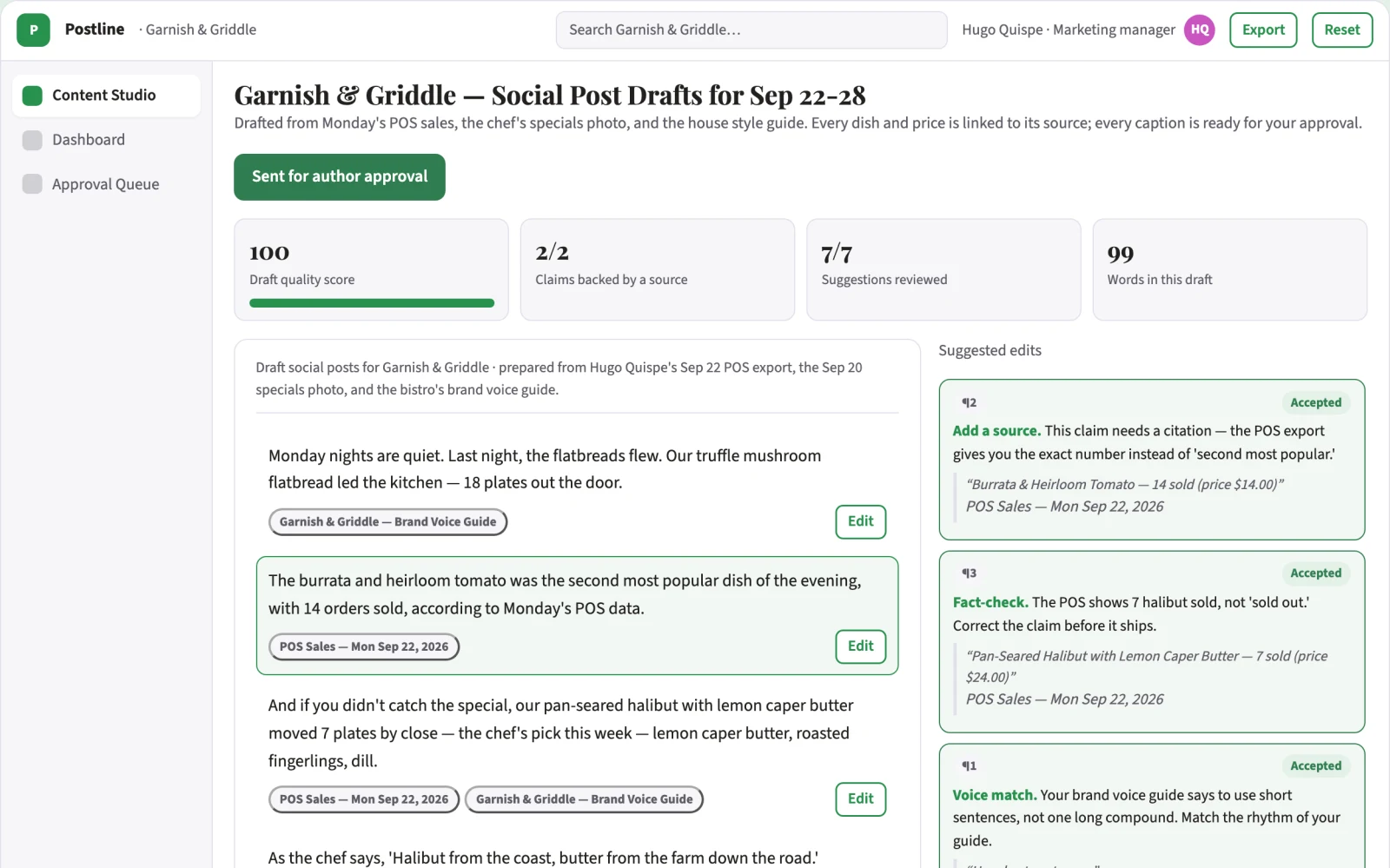
Key screens: Dashboard, Content Studio, Approval Queue. Use a dashboard to view posting schedule and performance. The Content Studio allows uploading menu items and viewing generated drafts. The Approval Queue lets managers review and approve content before publishing. The main screen is the Content Studio where the user inputs menu data and sees the output
Accounts and administration
User roles, approval workflows, audit trails, version history
Integrations and data access
Point of sale systems, social media scheduling APIs
How we build it
We build with our own AI software development factory, so most implementations take days to a few weeks of creation time, not months. You see working software at every step, and exact timing depends on availability.
- 1
Scoping call
Day 1Thirty minutes on your process, your data and how you want to run it: for your own team, or for your clients. You get a fixed scope and price for the MVP.
- 2
MVP
2 daysOne buyer segment, one recurring use case. Manual review in the loop. Built by our AI software factory.
- 3
Paid pilot
3 daysAccounts, roles, review states, audit trail and the first integration, hardened for two to three paying pilot customers.
- 4
Full product
5 daysSelf-serve onboarding, billing, monitoring and the wider integration set.
- 5
Run and improve
MonthlyWe host, monitor and improve it for a fixed monthly fee, or hand it over to your team. How the retainer works.
Why we start with an MVP
An MVP, or minimum viable product, is the smallest version that your users can actually work with. It is not a cheap version of the full solution. It is a test, built to answer the questions that decide whether the rest is worth building.
- Pick the riskiest assumption. Here: will marketing managers at independent restaurants use it to solve "staff are too busy serving customers to maintain a consistent social media presence"?
- Build only what tests it. One team, one use case, a few core modules. People do the rest by hand for now.
- Run a paid pilot. Compare current posting frequency and engagement against the automated output to prove value
- Measure, then decide. Track posting frequency increase and engagement rate on new posts. Then expand, change course or stop, with evidence instead of opinions.
MVP scope for this solution. Ship a tool where a manager uploads a photo and selects a dish. The AI generates five ready-to-post social media items with captions and hashtags. No POS integration yet. Get that in front of three restaurant groups in 30 days
After the MVP. Full POS integration, video generation from chalkboard specials, multi-location management
What the build depends on. Large language models, image generation models, social media APIs
Investment
A planning range to start the conversation, not a quote. You pay per phase, so you can stop after the MVP.
- Phase 1
MVP
One buyer segment, one recurring use case. Manual review in the loop.
- Phase 2
Paid pilot
Accounts, roles, review states, audit trail and the first integration, hardened for two to three paying pilot customers.
- Phase 3
Full product
Self-serve onboarding, billing, monitoring and the wider integration set.
Indicative total, MVP to full product$16,00010 days of creation time · start with the MVP from $5,000
Running costs per month
A rough indication of monthly hosting and AI model costs once it is live, not tested. Real costs depend on usage, file sizes and the models chosen.
| Stage | Hosting and infrastructure | AI usage | Total per month |
|---|---|---|---|
| MVP and paid pilotabout 3 customers | $30–$60 | $70–$140 | $100–$200 |
| Full productabout 50 customers | $110–$210 | $700–$1,400 | $810–$1,610 |
Run it or resell it
For your own team
Marketing managers at independent restaurants run it inside the business: sales data, menu images, daily specials photos, brand guidelines in, scheduled social media posts with images and captions out, reviewed by your people.
As part of your offer
Agencies, consultancies and software companies can offer it to their own clients under their brand. We build and maintain it; you sell and deliver it.
Your brand, or this one
Run it under your own brand, or start from this concept style.
- primary
#27914e - accent
#c954c1 - surface
#e4f1e9 - ink
#22201e
- Headings
- Playfair Display
- Text
- Source Sans 3
- Voice
- Welcoming, lively, attentive
Selling it to your own clients: the go-to-market playbook
Pricing to test
$99 per venue per month
Message to test
Automate your restaurant's social media with real-time sales data
Where to find buyers
Restaurant associations, local business directories, hospitality trade shows
Lead magnet
A free demonstration of five ready-to-post posts for one menu item
The first 30 days
- Week 1: Set up the tool and upload menu data.
- Week 2: Generate and review first set of posts.
- Week 3: Gather feedback from three restaurant groups.
- Week 4: Refine the brand voice and prepare for launch
Paid pilot
Compare current posting frequency and engagement against the automated output to prove value
Success metrics
Posting frequency increase, engagement rate on new posts
Retention and expansion
Monthly subscription renewal based on performance
Why clients would pick it
Custom brand voice tuning and integration with specific POS data structures
Alternatives and positioning
Manual posting by staff, generic design tools like Canva
Main delivery costs
AI compute costs for image and text generation
Safeguards
Brand keyword filters, approval gates, content moderation flags