Mira Learning Worlds
The tutor builds the entire learning world around one child's question in seconds, which no static library of lesson apps can match.
- For
- Homeschooling parents and teachers at small private schools
- Solves
- One-size-fits-all lessons lose the child before anything sticks.
- Delivers
- Adaptive 3D learning scenes, session mastery summary and a two-sentence voice note per session
- Built in
- about 5 weeks of creation time, MVP in 5 days
- Investment
- $10,000 for the MVP, $39,500 for the full product
- Run it
- Inside your business, or as part of your offer to clients
What it does
For homeschooling parents and teachers at small private schools, turn subject goals, a child's questions and session progress data into adaptive 3D learning scenes and a mastery summary.
- Generate a themed 3D scene for the day's topic in seconds.
- Adapt difficulty and examples from pauses and choices.
- Answer why questions with age-appropriate explanations.
- Introduce story characters to re-engage a distracted learner.
- Log mastery and avoidance per concept.
- Deliver a two-sentence voice note to the parent after each session.
What goes in, what comes out
- Subject lists
- Learning goals
- Age
- Language preferences
- Session progress data

AI drafts, people review. Role-based learning platform and course authoring console.
- Adaptive 3D learning scenes
- Session mastery summary
- A two-sentence voice note per session
How it works
The workflow
- InStart with
Subject lists, learning goals, age and language preferences, and session progress data
- 1
Parent sets subjects and goals
- 2
Child starts a session
- 3
Mira asks what the child is curious about
- 4
The AI generates a themed world with interactive objects
- 5
The child explores and solves puzzles
- 6
The AI logs mastery signals and drafts a summary
- 7
The guardian reviews the summary and approves the next session
- 8
Finish with approved session notes
- OutFinish with
Adaptive 3D learning scenes, session mastery summary and a two-sentence voice note per session
AI does the heavy lifting, people stay in charge
A language model interprets the child's questions, plans the scene structure and adapts difficulty, with voice synthesis giving the tutor a natural presence, and image or 3D generation building themed environments. A curated knowledge base limits what the tutor draws on. A parent or teacher reviews each session log and approves the next difficulty level before it is offered.
What your team sees
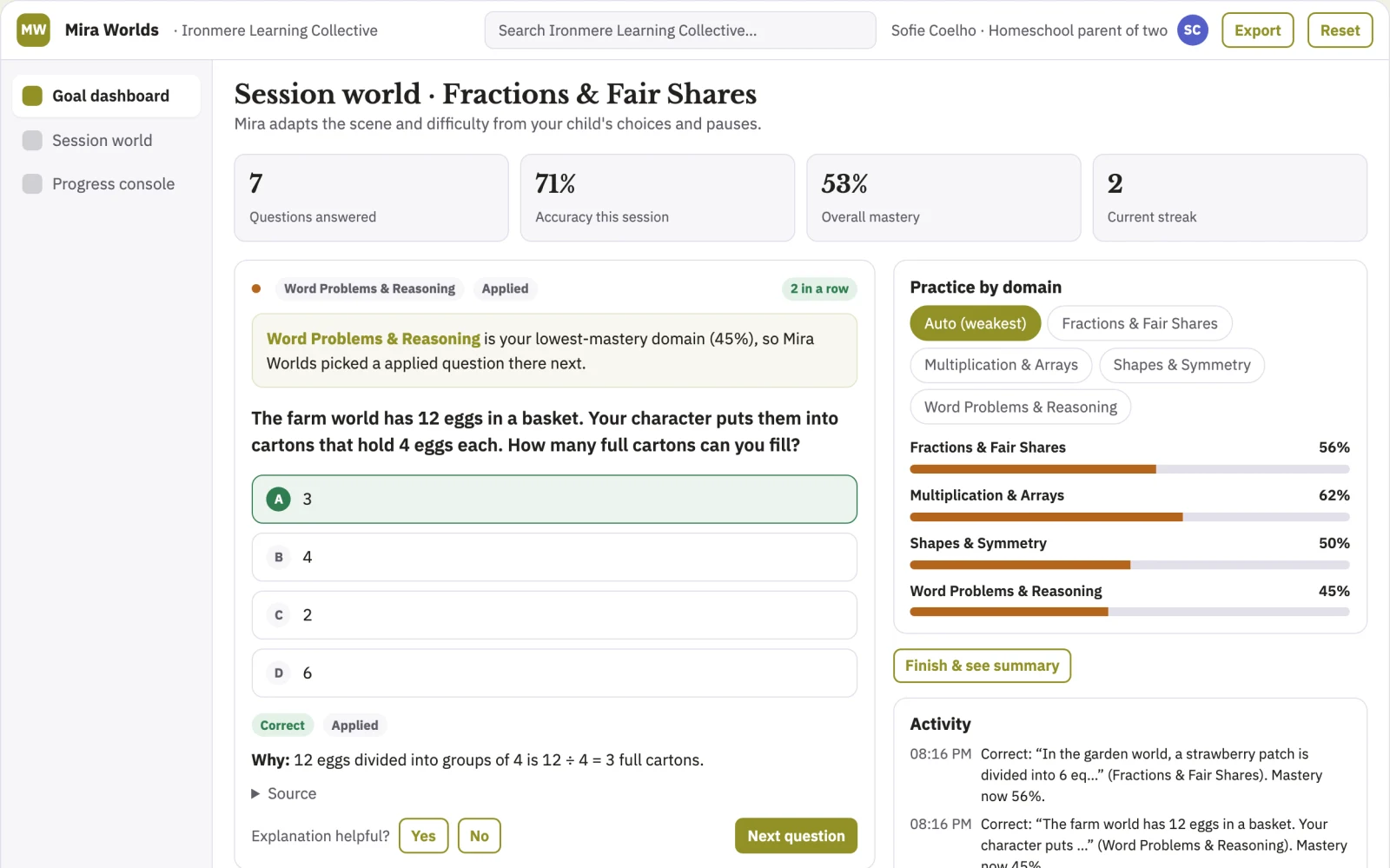
Key screens: goal dashboard, session world, progress console. The parent dashboard is a simple grid of subjects, weekly goals and current difficulty. The session world is the live scene view with a side panel of topic choices, touchable objects and puzzles. The progress console shows what was mastered, what was skipped, and a two-sentence voice summary per session. Let users switch between learner view and observer view, compare past sessions side by side, and mark scenes as reviewed, paused or approved. In this product, the first view is goal dashboard, followed by session world and progress console.
Accounts and administration
Parent and teacher accounts, child profiles with age settings, session versions, difficulty approval states, guardian review log, content filter audit trail and a record of scenes generated per account.
Integrations and data access
Start simple: roster import for schools via CSV, calendar reminders, and export of mastery summaries as PDF. Later, Google Classroom and SIS gradebook connections.
How we build it
We build with our own AI software development factory, so most implementations take days to a few weeks of creation time, not months. You see working software at every step, and exact timing depends on availability.
- 1
Scoping call
Day 1Thirty minutes on your process, your data and how you want to run it: for your own team, or for your clients. You get a fixed scope and price for the MVP.
- 2
MVP
5 daysOne buyer segment, one recurring use case; first modules: a pizza kitchen fraction scene and a measurement scene, both generated for tablet screens without a headset, with every AI summary manually checked before release to the ten test families. Manual review in the loop. Built by our AI software factory.
- 3
Paid pilot
6 daysAccounts, roles, review states, audit trail and the first integration, hardened for two to three paying pilot customers.
- 4
Full product
2 weeksSelf-serve onboarding, billing, monitoring and the wider integration set.
- 5
Run and improve
MonthlyWe host, monitor and improve it for a fixed monthly fee, or hand it over to your team. How the retainer works.
Why we start with an MVP
An MVP, or minimum viable product, is the smallest version that your users can actually work with. It is not a cheap version of the full solution. It is a test, built to answer the questions that decide whether the rest is worth building.
- Pick the riskiest assumption. Here: will homeschooling parents and teachers at small private schools use it to solve "one-size-fits-all lessons lose the child before anything sticks"?
- Build only what tests it. One team, one use case, a few core modules. People do the rest by hand for now.
- Run a paid pilot. Ten families use the fractions module for four weeks with a baseline of current lesson time on task and a pre-test of fraction understanding.
- Measure, then decide. Track average minutes of focused engagement per session and and improvement in topic assessment scores between pre-test and post-test. Then expand, change course or stop, with evidence instead of opinions.
MVP scope for this solution. One buyer: homeschooling parents. One use case: fractions. First two modules: a pizza kitchen fraction scene and a measurement scene, both generated for tablet screens without a headset, with every AI summary manually checked before release to the ten test families.
After the MVP. After the paid pilot, automate scene generation for full topic lists, automate difficulty adjustments from logged pauses, automate voice note drafting with sample checks, and open a teacher dashboard for class-level insight.
What the build depends on. A language model with strict content filtering, real-time 3D generation, voice synthesis in target languages, a curated knowledge base, and a tablet runtime before any headset build.
Investment
A planning range to start the conversation, not a quote. You pay per phase, so you can stop after the MVP.
- Phase 1
MVP
One buyer segment, one recurring use case; first modules: a pizza kitchen fraction scene and a measurement scene, both generated for tablet screens without a headset, with every AI summary manually checked before release to the ten test families. Manual review in the loop.
- Phase 2
Paid pilot
Accounts, roles, review states, audit trail and the first integration, hardened for two to three paying pilot customers.
- Phase 3
Full product
Self-serve onboarding, billing, monitoring and the wider integration set.
Indicative total, MVP to full product$39,500about 5 weeks of creation time · start with the MVP from $10,000
Running costs per month
A rough indication of monthly hosting and AI model costs once it is live, not tested. Real costs depend on usage, file sizes and the models chosen.
| Stage | Hosting and infrastructure | AI usage | Total per month |
|---|---|---|---|
| MVP and paid pilotabout 3 customers | $30–$60 | $50–$110 | $80–$170 |
| Full productabout 50 customers | $110–$210 | $420–$840 | $530–$1,050 |
Run it or resell it
For your own team
Homeschooling parents and teachers at small private schools run it inside the business: subject lists, learning goals, age and language preferences, and session progress data in, adaptive 3D learning scenes, session mastery summary and a two-sentence voice note per session out, reviewed by your people.
As part of your offer
Agencies, consultancies and software companies can offer it to their own clients under their brand. We build and maintain it; you sell and deliver it.
Your brand, or this one
Run it under your own brand, or start from this concept style.
- primary
#919127 - accent
#545ec9 - surface
#f1f1e4 - ink
#22201e
- Headings
- Libre Baskerville
- Text
- IBM Plex Sans
- Voice
- Encouraging, patient, precise
Selling it to your own clients: the go-to-market playbook
Pricing to test
Test at 29 USD per month per child for families, and an annual school licence at 15 USD per child per month with a teacher dashboard, as a hypothesis to validate in the pilot.
Message to test
A patient tutor who builds a new world around whatever your child asks, and tells you in two sentences whether it worked.
Where to find buyers
Homeschooling communities and forums, VR family groups, private school networks and education conferences, and teacher recommendation groups.
Lead magnet
A free fraction pizza kitchen scene families can run on a tablet in one ten-minute session, with the AI-generated summary included.
The first 30 days
- Week 1: build the fractions module with two tablet scenes and the parent dashboard.
- Week 2: recruit ten homeschooling families and set baselines for attention and concept mastery.
- Week 3: run daily sessions, collect pause and mastery logs, and manually review every voice note.
- Week 4: analyse usage, fix the weakest scenes, and present the pilot findings with a school licence proposal.
Paid pilot
Ten families use the fractions module for four weeks with a baseline of current lesson time on task and a pre-test of fraction understanding. The decision: if session time on task and pre-test to post-test gains beat baseline by the agreed margin, convert to the 29 USD monthly plan and open a school pilot.
Success metrics
Average minutes of focused engagement per session, and improvement in topic assessment scores between pre-test and post-test.
Retention and expansion
Ongoing monthly subscription with new scenes added to each subject, difficulty levels approved by parents each term, and school licences renewed annually with a term-by-term teacher dashboard.
Why clients would pick it
Every session logs which examples, characters and difficulty steps hold attention, so the adaptation rules improve with each child and the scene library compounds; a competitor starting fresh has no usage history to learn from.
Alternatives and positioning
Static lesson apps, educational videos and worksheet packs, which cannot sense when a child has disengaged. This product adapts the scene mid-session and reports back to the parent in plain language.
Main delivery costs
Inference and 3D generation compute per session, voice synthesis, content moderation review, tablet and headset device testing, and ongoing curation of the knowledge base.
Safeguards
Tight content filter and a narrow curated knowledge base, no unsafe content, no medical or diagnostic claims, age-appropriate language limits, parent approval before each new difficulty tier, no headset features for children under an agreed minimum age, no unreviewed open-ended web answers, and a full audit trail of every scene generated and every summary sent.