Referral Triage and Routing
The system learns each clinic's specific queue structure and referral language, so it routes more accurately over time than a generic inbox filter.
- For
- Operations leads at multi-disciplinary clinics and allied health networks
- Solves
- Inbound patient referrals are hand-sorted and often miss urgency, causing delays and wrong inboxes.
- Delivers
- Structured referral summaries with suggested queue and urgency flag
- Built in
- about 5 weeks of creation time, MVP in 6 days
- Investment
- $10,000 for the MVP, $40,500 for the full product
- Run it
- Inside your business, or as part of your offer to clients
What it does
For operations leads at multi-disciplinary clinics and allied health networks, turn inbound referral emails, portal submissions and faxes into structured summaries with a suggested clinical queue and urgency flag.
- Extract patient demographics, reason for referral and provider notes from email, portal or fax.
- Classify the case into a predefined clinical queue.
- Assign an urgency flag based on keywords and phrases.
- Route routine referrals to the correct clinician's task list.
- Push urgent referrals to the top with a notification to the on-call clinician.
- Log all routing decisions and overrides for audit.
What goes in, what comes out
- Inbound referral emails
- Portal submissions
- Faxes

AI drafts, people review. Client intake portal and staff exception queue.
- Structured referral summaries with suggested queue
- Urgency flag
How it works
The workflow
- InStart with
Inbound referral emails, portal submissions and faxes
- 1
Referral arrives
- 2
System reads text and attachments
- 3
Extracts structured fields
- 4
Classifies queue
- 5
Assigns urgency
- 6
Routes to clinician or flags urgent
- 7
Logs the decision
- OutFinish with
Structured referral summaries with suggested queue and urgency flag
AI does the heavy lifting, people stay in charge
Use language models to read referral text and attachments, extract demographics and reason for referral, and classify queue and urgency. A clinician reviews all high-urgency flags within a short window and audits a sample of routine referrals to catch edge cases before anything is used.
What your team sees
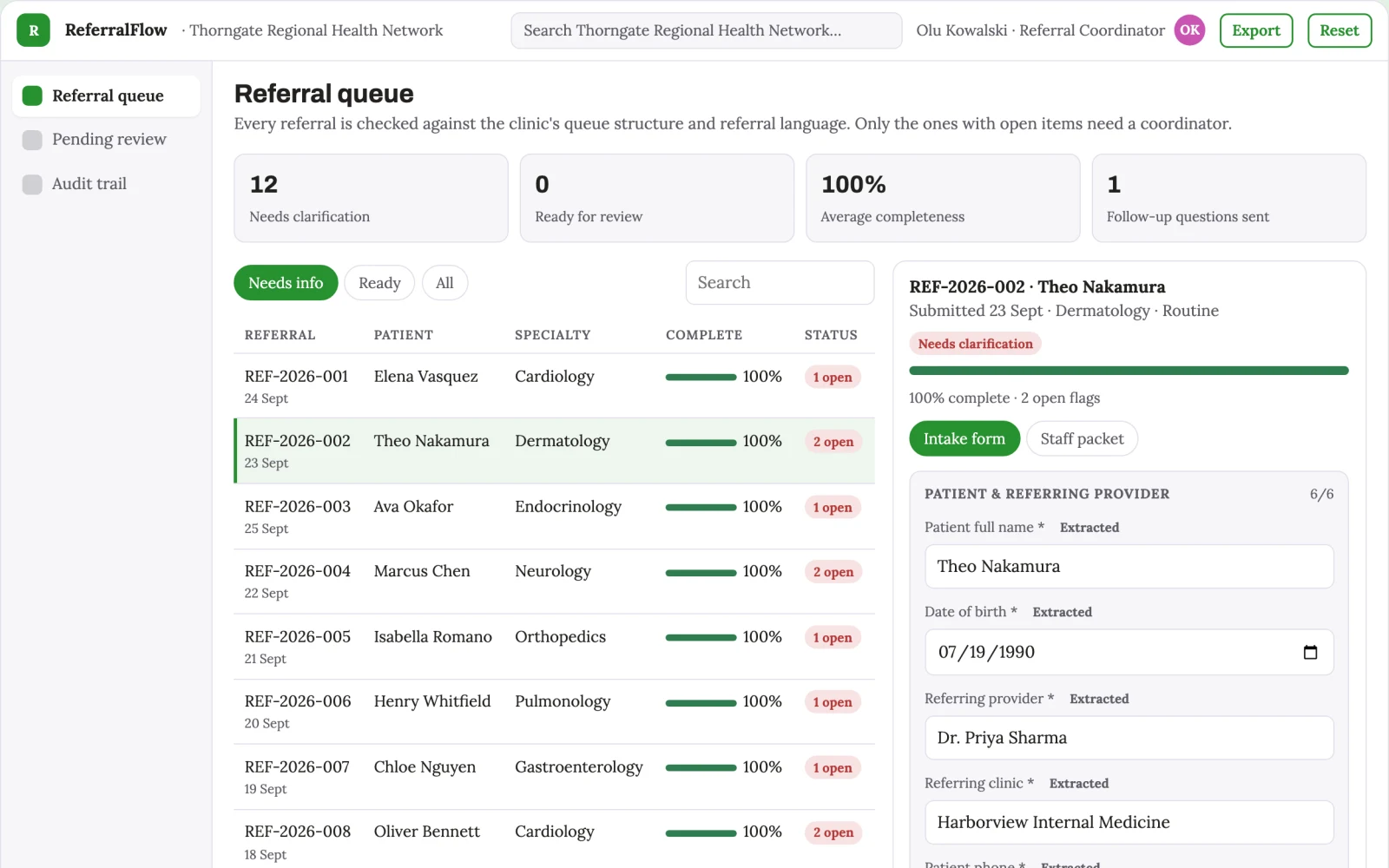
Key screens: Inbox monitor, referral summary, queue board. Use a central inbox feed showing incoming referrals with a status badge, a detail panel for the extracted summary and original document, and a queue board showing each clinician's task list with urgent items pinned to the top. Let users open a referral to review the AI's extraction and override the queue or urgency. Display routed, pending and flagged states. In this product, the first view is inbox monitor, followed by referral summary and queue board.
Accounts and administration
User roles for intake coordinators and clinicians, queue assignments, urgency overrides, audit trail of routing decisions, and version history of referral records.
Integrations and data access
Start with a monitored email inbox, then add a secure portal upload and fax-to-email gateway. Later connect to practice management systems for task creation.
How we build it
We build with our own AI software development factory, so most implementations take days to a few weeks of creation time, not months. You see working software at every step, and exact timing depends on availability.
- 1
Scoping call
Day 1Thirty minutes on your process, your data and how you want to run it: for your own team, or for your clients. You get a fixed scope and price for the MVP.
- 2
MVP
6 daysOne buyer segment, one recurring use case; first modules: extraction and queue assignment. Manual review in the loop. Built by our AI software factory.
- 3
Paid pilot
7 daysAccounts, roles, review states, audit trail and the first integration, hardened for two to three paying pilot customers.
- 4
Full product
2 weeksSelf-serve onboarding, billing, monitoring and the wider integration set.
- 5
Run and improve
MonthlyWe host, monitor and improve it for a fixed monthly fee, or hand it over to your team. How the retainer works.
Why we start with an MVP
An MVP, or minimum viable product, is the smallest version that your users can actually work with. It is not a cheap version of the full solution. It is a test, built to answer the questions that decide whether the rest is worth building.
- Pick the riskiest assumption. Here: will operations leads at multi-disciplinary clinics and allied health networks use it to solve "inbound patient referrals are hand-sorted and often miss urgency, causing delays and wrong inboxes"?
- Build only what tests it. One team, one use case, a few core modules. People do the rest by hand for now.
- Run a paid pilot. A paid pilot with one clinic processing 15 referrals a day for 30 days.
- Measure, then decide. Track two measurable outcomes: average time from referral arrival to clinician task list and and percentage of urgent referrals flagged within one hour. Then expand, change course or stop, with evidence instead of opinions.
MVP scope for this solution. One buyer: a single multi-disciplinary clinic. One use case: email referrals only. First two modules: extraction and queue assignment. Manual review of every referral by a coordinator before it is routed.
After the MVP. After the paid pilot, automate routine routing without manual review, add portal and fax ingestion, and introduce escalation rules for repeated urgent flags.
What the build depends on. Needs a secure document parsing pipeline, a language model with medical text handling, and a queue management interface with role-based access.
Investment
A planning range to start the conversation, not a quote. You pay per phase, so you can stop after the MVP.
- Phase 1
MVP
One buyer segment, one recurring use case; first modules: extraction and queue assignment. Manual review in the loop.
- Phase 2
Paid pilot
Accounts, roles, review states, audit trail and the first integration, hardened for two to three paying pilot customers.
- Phase 3
Full product
Self-serve onboarding, billing, monitoring and the wider integration set.
Indicative total, MVP to full product$40,500about 5 weeks of creation time · start with the MVP from $10,000
Running costs per month
A rough indication of monthly hosting and AI model costs once it is live, not tested. Real costs depend on usage, file sizes and the models chosen.
| Stage | Hosting and infrastructure | AI usage | Total per month |
|---|---|---|---|
| MVP and paid pilotabout 3 customers | $50–$100 | $40–$90 | $90–$190 |
| Full productabout 50 customers | $190–$380 | $280–$560 | $470–$940 |
Run it or resell it
For your own team
Operations leads at multi-disciplinary clinics and allied health networks run it inside the business: inbound referral emails, portal submissions and faxes in, structured referral summaries with suggested queue and urgency flag out, reviewed by your people.
As part of your offer
Agencies, consultancies and software companies can offer it to their own clients under their brand. We build and maintain it; you sell and deliver it.
Your brand, or this one
Run it under your own brand, or start from this concept style.
- primary
#27912f - accent
#c954b2 - surface
#e4f1e6 - ink
#22201e
- Headings
- Archivo
- Text
- Lora
- Voice
- Careful, kind, clinically plain
Selling it to your own clients: the go-to-market playbook
Pricing to test
Test at USD 300 per month per clinic, with a setup fee of USD 1,500 for initial queue configuration and model tuning.
Message to test
Stop hand-sorting referrals: let AI route each case to the right clinician and flag urgent ones instantly.
Where to find buyers
Healthcare operations conferences, allied health association newsletters, and direct outreach to clinic managers.
Lead magnet
A free trial where you forward 20 real referrals and receive a structured summary with suggested queue and urgency for each.
The first 30 days
- Week 1: Build the email ingestion and extraction pipeline.
- Week 2: Develop the queue classification and urgency flagging logic.
- Week 3: Create the inbox monitor and queue board interface.
- Week 4: Run a manual review pilot with one clinic and refine routing accuracy.
Paid pilot
A paid pilot with one clinic processing 15 referrals a day for 30 days. Baseline is current manual routing time and missed urgency rate. Decision to continue is a 50% reduction in routing time and zero urgent referrals missed.
Success metrics
Two measurable outcomes: average time from referral arrival to clinician task list, and percentage of urgent referrals flagged within one hour.
Retention and expansion
The system keeps earning through a monthly subscription, with ongoing value from improved routing accuracy and reduced coordinator workload. Add a quarterly review of routing decisions to refine the model.
Why clients would pick it
The routing model is fine-tuned on each clinic's historical referrals and clinician preferences, creating a proprietary dataset that improves with every case and is hard to replicate.
Alternatives and positioning
Receptionists and intake coordinators manually reading and forwarding referrals, or generic email rules. This differs by automating the reading and classification step and by flagging urgency consistently.
Main delivery costs
Main delivery costs are language model API usage per referral, secure document storage, and a clinician's time for the review window during the pilot.
Safeguards
Limit AI to suggesting queue and urgency, never making final routing decisions without a human override. Require clinician review of all high-urgency flags. Restrict access to authorised staff only. Must not access patient records beyond the referral content and must not share data outside the clinic's secure environment.