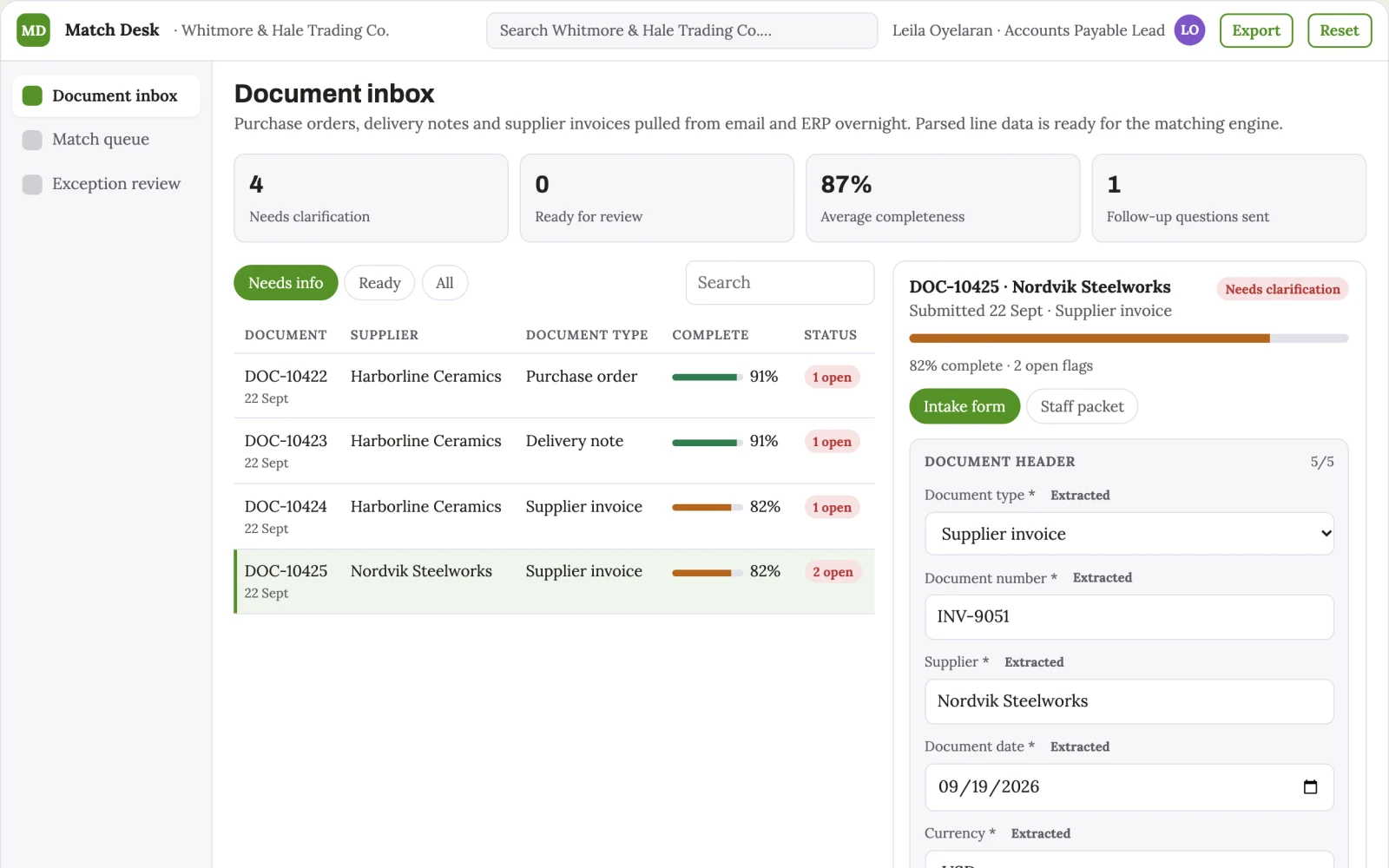
Overnight Invoice Matcher
Invoices matched overnight within the tolerances you set, with every exception waiting in a review queue.
- For
- Finance leads at mid-market importers, wholesalers or manufacturers
- Solves
- Accounts payable clerks manually match purchase orders, delivery notes and invoices, wasting hours and stalling payments.
- Delivers
- Auto-matched payment queue, exception list with highlighted variances, audit log
- Built in
- about 5 weeks of creation time, MVP in 6 days
- Investment
- $10,500 for the MVP, $42,000 for the full product
- Run it
- Inside your business, or as part of your offer to clients
What it does
For finance leads at mid-market importers, wholesalers or manufacturers, turn purchase orders, delivery notes and supplier invoices into an auto-matched payment queue with a highlighted exception list.
- Ingest purchase orders, delivery notes and invoices from email and ERP.
- Extract line items, quantities, unit prices and totals.
- Match across three documents with configurable tolerances.
- Post matched sets for payment approval.
- Flag exceptions with specific discrepancies.
- Log all actions with timestamps for audit.
What goes in, what comes out
- Purchase orders
- Delivery notes
- Supplier invoices
- ERP access

AI drafts, people review. Client intake portal and staff exception queue.
- Auto-matched payment queue
- Exception list with highlighted variances
- Audit log
How it works
The workflow
- InStart with
Purchase orders, delivery notes, supplier invoices, ERP access
- 1
Connect ERP and inbox
- 2
Pull documents nightly
- 3
Parse line data
- 4
Run matching engine
- 5
Review exceptions
- 6
Approve matched sets
- 7
Schedule payments
- OutFinish with
Auto-matched payment queue, exception list with highlighted variances, audit log
AI does the heavy lifting, people stay in charge
Use document parsing models to extract line-level data from unstructured layouts, and a matching engine to compare quantities and prices. A human checks all exceptions and spot-checks matched sets before payment approval.
What your team sees
Key screens: Document inbox, match queue, exception review. Use a dashboard for daily status, a list view of matched sets with timestamps, and a detail panel showing line-level comparisons. Flag variances with colour and attach source documents. Allow filters by supplier, date or tolerance breach. In this product, the first view is document inbox, followed by match queue and exception review.
Accounts and administration
User roles for clerk and approver, document versions, tolerance settings, approval states, audit trail of all matches and reviews, and access controls for sensitive supplier data.
Integrations and data access
ERP systems like SAP or NetSuite, email inboxes, freight portals, PDF storage folders.
How we build it
We build with our own AI software development factory, so most implementations take days to a few weeks of creation time, not months. You see working software at every step, and exact timing depends on availability.
- 1
Scoping call
Day 1Thirty minutes on your process, your data and how you want to run it: for your own team, or for your clients. You get a fixed scope and price for the MVP.
- 2
MVP
6 daysOne buyer segment, one recurring use case. Manual review in the loop. Built by our AI software factory.
- 3
Paid pilot
7 daysAccounts, roles, review states, audit trail and the first integration, hardened for two to three paying pilot customers.
- 4
Full product
3 weeksSelf-serve onboarding, billing, monitoring and the wider integration set.
- 5
Run and improve
MonthlyWe host, monitor and improve it for a fixed monthly fee, or hand it over to your team. How the retainer works.
Why we start with an MVP
An MVP, or minimum viable product, is the smallest version that your users can actually work with. It is not a cheap version of the full solution. It is a test, built to answer the questions that decide whether the rest is worth building.
- Pick the riskiest assumption. Here: will finance leads at mid-market importers, wholesalers or manufacturers use it to solve "accounts payable clerks manually match purchase orders, delivery notes and invoices, wasting hours and stalling payments"?
- Build only what tests it. One team, one use case, a few core modules. People do the rest by hand for now.
- Run a paid pilot. Run a paid pilot with one supplier for a month, measure baseline manual hours versus automated hours, and decide on scaling based on accuracy and time saved.
- Measure, then decide. Track percentage of transactions auto-matched without exception and and hours saved per week in accounts payable. Then expand, change course or stop, with evidence instead of opinions.
MVP scope for this solution. One supplier, one ERP connector, document parsing and matching modules, manual review queue for exceptions.
After the MVP. After the paid pilot, automate tolerance adjustments, add multi-currency support, integrate with more ERPs, and auto-route matched sets to payment systems.
What the build depends on. Reliable document parsing models, ERP API access, secure data handling for financial documents.
Investment
A planning range to start the conversation, not a quote. You pay per phase, so you can stop after the MVP.
- Phase 1
MVP
One buyer segment, one recurring use case. Manual review in the loop.
- Phase 2
Paid pilot
Accounts, roles, review states, audit trail and the first integration, hardened for two to three paying pilot customers.
- Phase 3
Full product
Self-serve onboarding, billing, monitoring and the wider integration set.
Indicative total, MVP to full product$42,000about 5 weeks of creation time · start with the MVP from $10,500
Running costs per month
A rough indication of monthly hosting and AI model costs once it is live, not tested. Real costs depend on usage, file sizes and the models chosen.
| Stage | Hosting and infrastructure | AI usage | Total per month |
|---|---|---|---|
| MVP and paid pilotabout 3 customers | $50–$100 | $40–$90 | $90–$190 |
| Full productabout 50 customers | $190–$380 | $280–$560 | $470–$940 |
Run it or resell it
For your own team
Finance leads at mid-market importers, wholesalers or manufacturers run it inside the business: purchase orders, delivery notes, supplier invoices, ERP access in, auto-matched payment queue, exception list with highlighted variances, audit log out, reviewed by your people.
As part of your offer
Agencies, consultancies and software companies can offer it to their own clients under their brand. We build and maintain it; you sell and deliver it.
Your brand, or this one
Run it under your own brand, or start from this concept style.
- primary
#559127 - accent
#7d54c9 - surface
#eaf1e4 - ink
#22201e
- Headings
- Archivo
- Text
- Lora
- Voice
- Exact, sober, trustworthy
Selling it to your own clients: the go-to-market playbook
Pricing to test
Test pricing at $1,500 per month per client, with a setup fee of $5,000.
Message to test
Stop spending a week on three-way matching; let exceptions be the only thing you see in the morning.
Where to find buyers
LinkedIn, finance webinars, industry conferences, direct outreach to finance leads.
Lead magnet
A free pilot matching one supplier's transactions for a month, with a report on time saved.
The first 30 days
- Week 1: Set up ERP connector and email ingestion.
- Week 2: Build parsing and matching engine for one supplier.
- Week 3: Test on real documents and tune tolerances.
- Week 4: Deliver exception queue and review with client.
Paid pilot
Run a paid pilot with one supplier for a month, measure baseline manual hours versus automated hours, and decide on scaling based on accuracy and time saved.
Success metrics
Percentage of transactions auto-matched without exception, and hours saved per week in accounts payable.
Retention and expansion
Ongoing subscription with monthly tuning and support; as more suppliers are added, switching costs rise.
Why clients would pick it
The more supplier documents processed, the better the parsing models adapt to real-world layouts and the more tuned the tolerance rules become, creating a data moat.
Alternatives and positioning
Spreadsheets, shared inboxes and manual comparison; this differs by automating the parsing and matching overnight, leaving only exceptions for humans.
Main delivery costs
Document parsing API usage, ERP integration development, cloud hosting, and ongoing model tuning.
Safeguards
Limit access to finance roles only, require approval for payments, log all actions, and never auto-pay without human sign-off. It must not override tolerance thresholds without explicit approval.