Rubric Feedback Drafting
Drafts cite specific evidence from each student's own text, so the feedback is grounded and personal rather than generic.
- For
- Heads of English or History in secondary schools
- Solves
- Teachers spend evenings typing repetitive comments into student work, so feedback shrinks to a few hurried lines.
- Delivers
- Approved feedback comments with cited evidence and next actions
- Built in
- 10 days of creation time, MVP in 2 days
- Investment
- $5,000 for the MVP, $15,000 for the full product
- Run it
- Inside your business, or as part of your offer to clients
What it does
For Heads of English or History in secondary schools, turn student submissions and a marking rubric into draft feedback comments with cited evidence and a next action.
- Extract text from student submissions.
- Map each submission against rubric criteria.
- Draft a three-sentence comment per criterion with evidence.
- Flag contradictions or missing evidence.
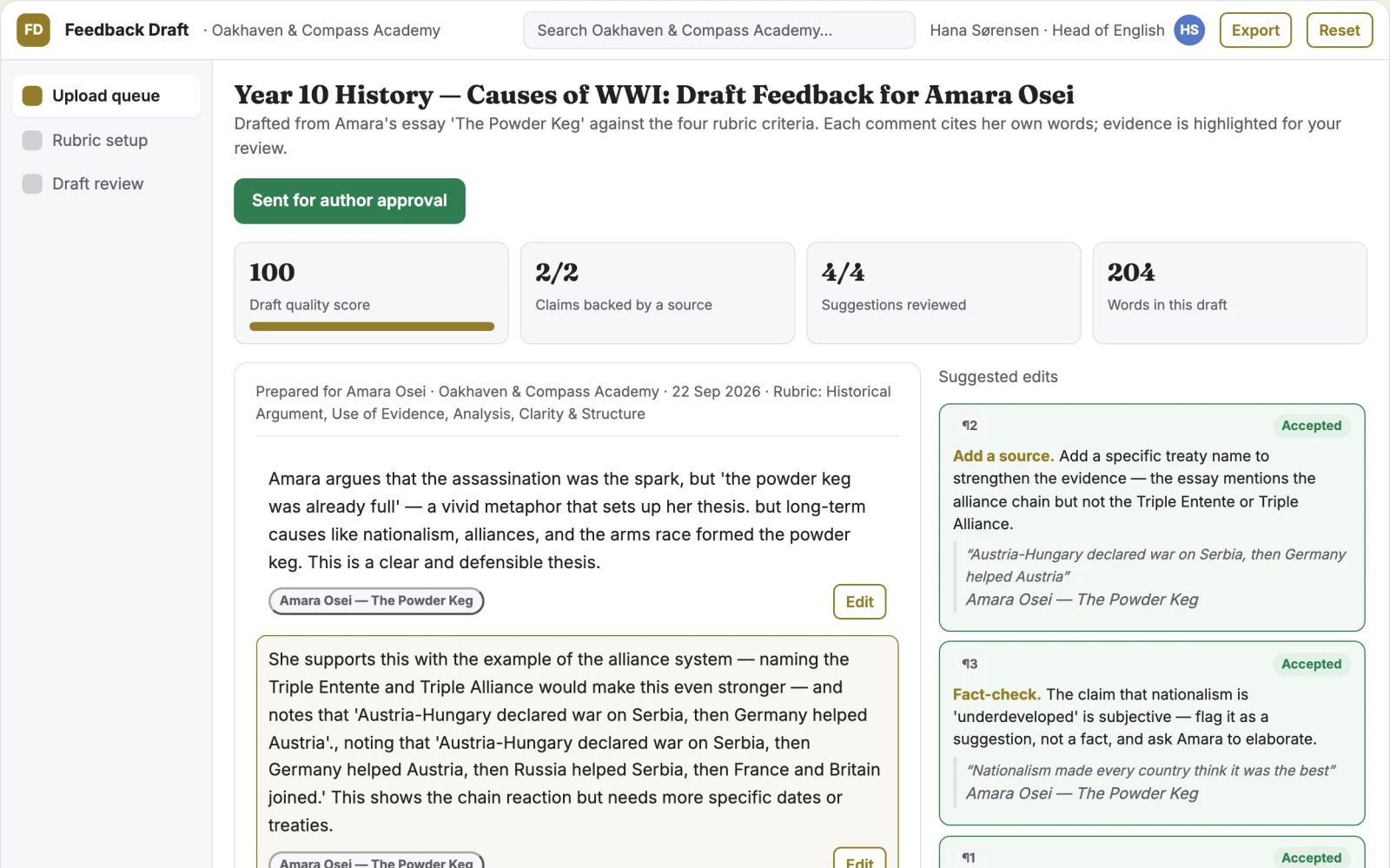
- Present drafts in a review queue for editing.
- Export approved feedback to a spreadsheet or LMS-ready format.
What goes in, what comes out
- Student submissions
- A marking rubric

AI drafts, people review. Source-based content workspace with editorial delivery.
- Approved feedback comments with cited evidence
- Next actions
How it works
The workflow
- InStart with
Student submissions and a marking rubric
- 1
Upload student files
- 2
Set rubric criteria
- 3
Run the drafting process
- 4
Review drafts in the queue
- 5
Edit comments
- 6
Approve the batch
- 7
Export feedback
- OutFinish with
Approved feedback comments with cited evidence and next actions
AI does the heavy lifting, people stay in charge
Use language models to read each submission, extract evidence, and draft comments against rubric criteria. Flag logical inconsistencies or missing evidence automatically. A teacher reviews every draft and approves or edits before anything is released; no comment reaches a student without human sign-off.
What your team sees
Key screens: Upload queue, rubric setup, draft review. Use a batch upload screen for student files, a rubric mapping screen for criteria, and a review queue showing one student's draft comments per criterion with evidence highlights. Allow inline editing and a toggle to view the original submission. Provide an approve-all button with a confirmation step. In this product, the first view is upload queue, followed by rubric setup and draft review.
Accounts and administration
Teacher accounts, batch versions, rubric versions, approval states, edit history, export logs, and a record of which comments were edited versus approved as drafted.
Integrations and data access
Start with CSV export for LMS import, then add Google Classroom and Moodle APIs.
How we build it
We build with our own AI software development factory, so most implementations take days to a few weeks of creation time, not months. You see working software at every step, and exact timing depends on availability.
- 1
Scoping call
Day 1Thirty minutes on your process, your data and how you want to run it: for your own team, or for your clients. You get a fixed scope and price for the MVP.
- 2
MVP
2 daysOne buyer segment, one recurring use case; first modules: text extraction and draft generation. Manual review in the loop. Built by our AI software factory.
- 3
Paid pilot
3 daysAccounts, roles, review states, audit trail and the first integration, hardened for two to three paying pilot customers.
- 4
Full product
5 daysSelf-serve onboarding, billing, monitoring and the wider integration set.
- 5
Run and improve
MonthlyWe host, monitor and improve it for a fixed monthly fee, or hand it over to your team. How the retainer works.
Why we start with an MVP
An MVP, or minimum viable product, is the smallest version that your users can actually work with. It is not a cheap version of the full solution. It is a test, built to answer the questions that decide whether the rest is worth building.
- Pick the riskiest assumption. Here: will heads of English or History in secondary schools use it to solve "teachers spend evenings typing repetitive comments into student work, so feedback shrinks to a few hurried lines"?
- Build only what tests it. One team, one use case, a few core modules. People do the rest by hand for now.
- Run a paid pilot. A paid pilot with one secondary school department proves it by measuring time spent on feedback per batch and teacher approval rate.
- Measure, then decide. Track time saved per marking batch and percentage of drafts approved without major edits. Then expand, change course or stop, with evidence instead of opinions.
MVP scope for this solution. A single-teacher pilot accepting Word documents and a plain-text rubric. First two modules: text extraction and draft generation. Manual review in a spreadsheet output.
After the MVP. Automate formatting for specific LMS fields, add batch approval workflows, and introduce a feedback history per student to track progress over terms.
What the build depends on. Reliable text extraction from common file formats and a stable language model API for drafting.
Investment
A planning range to start the conversation, not a quote. You pay per phase, so you can stop after the MVP.
- Phase 1
MVP
One buyer segment, one recurring use case; first modules: text extraction and draft generation. Manual review in the loop.
- Phase 2
Paid pilot
Accounts, roles, review states, audit trail and the first integration, hardened for two to three paying pilot customers.
- Phase 3
Full product
Self-serve onboarding, billing, monitoring and the wider integration set.
Indicative total, MVP to full product$15,00010 days of creation time · start with the MVP from $5,000
Running costs per month
A rough indication of monthly hosting and AI model costs once it is live, not tested. Real costs depend on usage, file sizes and the models chosen.
| Stage | Hosting and infrastructure | AI usage | Total per month |
|---|---|---|---|
| MVP and paid pilotabout 3 customers | $30–$60 | $70–$140 | $100–$200 |
| Full productabout 50 customers | $110–$210 | $700–$1,400 | $810–$1,610 |
Run it or resell it
For your own team
Heads of English or History in secondary schools run it inside the business: student submissions and a marking rubric in, approved feedback comments with cited evidence and next actions out, reviewed by your people.
As part of your offer
Agencies, consultancies and software companies can offer it to their own clients under their brand. We build and maintain it; you sell and deliver it.
Your brand, or this one
Run it under your own brand, or start from this concept style.
- primary
#917c27 - accent
#5477c9 - surface
#f1eee4 - ink
#22201e
- Headings
- Fraunces
- Text
- Inter
- Voice
- Encouraging, patient, precise
Selling it to your own clients: the go-to-market playbook
Pricing to test
Test pricing at USD 49 per teacher per term, with a departmental discount for five or more licences.
Message to test
Draft personalised feedback for every student against your rubric, so you edit and release instead of starting from a blank page.
Where to find buyers
Education conferences, teacher forums, and direct outreach to heads of department via school email lists.
Lead magnet
A free sample report showing draft feedback for one uploaded student submission.
The first 30 days
- Week 1: Build text extraction and rubric input.
- Week 2: Implement draft generation with evidence citation.
- Week 3: Create the review queue and export.
- Week 4: Run a single-teacher pilot and collect feedback.
Paid pilot
A paid pilot with one secondary school department proves it by measuring time spent on feedback per batch and teacher approval rate. Baseline is current manual time; success is a 30% time saving with at least 80% of drafts accepted without major edits.
Success metrics
Time saved per marking batch and percentage of drafts approved without major edits.
Retention and expansion
The tool becomes part of the marking cycle each term; usage history and saved feedback styles make switching back to manual work costly.
Why clients would pick it
The rubric mapping and evidence extraction improve with more use, creating a feedback style profile per teacher that becomes harder to replicate.
Alternatives and positioning
Teachers type comments manually or use generic comment banks. This differs by generating tailored, evidence-based drafts that still require teacher approval.
Main delivery costs
Language model API usage per submission, basic hosting, and minimal support overhead.
Safeguards
Teachers must approve every comment before export. The system must not release feedback automatically, must not alter grades, and must flag any submission it cannot read clearly for manual review.