Recall List Recovery
The suppression list and human-first opt-out are built into every message, so the AI never contacts a bereaved family or a patient who has moved clinic.
- For
- Practice managers at private dental and physiotherapy clinics
- Solves
- Overdue patient recall lists are long, full of dead numbers, and rarely get fully worked through, so clinics miss care and revenue.
- Delivers
- Booked appointments, daily staff summary, flagged conversation log
- Built in
- about 4 weeks of creation time, MVP in 5 days
- Investment
- $8,500 for the MVP, $32,500 for the full product
- Run it
- Inside your business, or as part of your offer to clients
What it does
For practice managers at private dental and physiotherapy clinics, turn the overdue recall list from the practice management system into booked appointments and a clean daily exception queue.
- Pull overdue patients nightly from the practice management system.
- Check contact history and suppression list before any outreach.
- Choose channel by preference and bounce history.
- Send personalised SMS, email or AI voice call with live slot offers.
- Handle replies conversationally and propose two real slots.
- Generate a daily summary for staff sign-off.
What goes in, what comes out
- Overdue recall list
- Patient contact preferences
- Live appointment calendar
- Suppression list

AI drafts, people review. Client intake portal and staff exception queue.
- Booked appointments
- Daily staff summary
- Flagged conversation log
How it works
The workflow
- InStart with
Overdue recall list, patient contact preferences, live appointment calendar, suppression list
- 1
Pull overdue list
- 2
Filter suppression list
- 3
Select channel
- 4
Send personalised message
- 5
Handle replies with AI
- 6
Propose and book slots
- 7
Review daily summary
- OutFinish with
Booked appointments, daily staff summary, flagged conversation log
AI does the heavy lifting, people stay in charge
Use language models to draft plain-language messages and run a conversational voice or text agent that answers simple questions and proposes slots. A deterministic scheduler checks recall dates and suppression flags. A human receptionist reviews every booking and any flagged reply before it is committed.
What your team sees
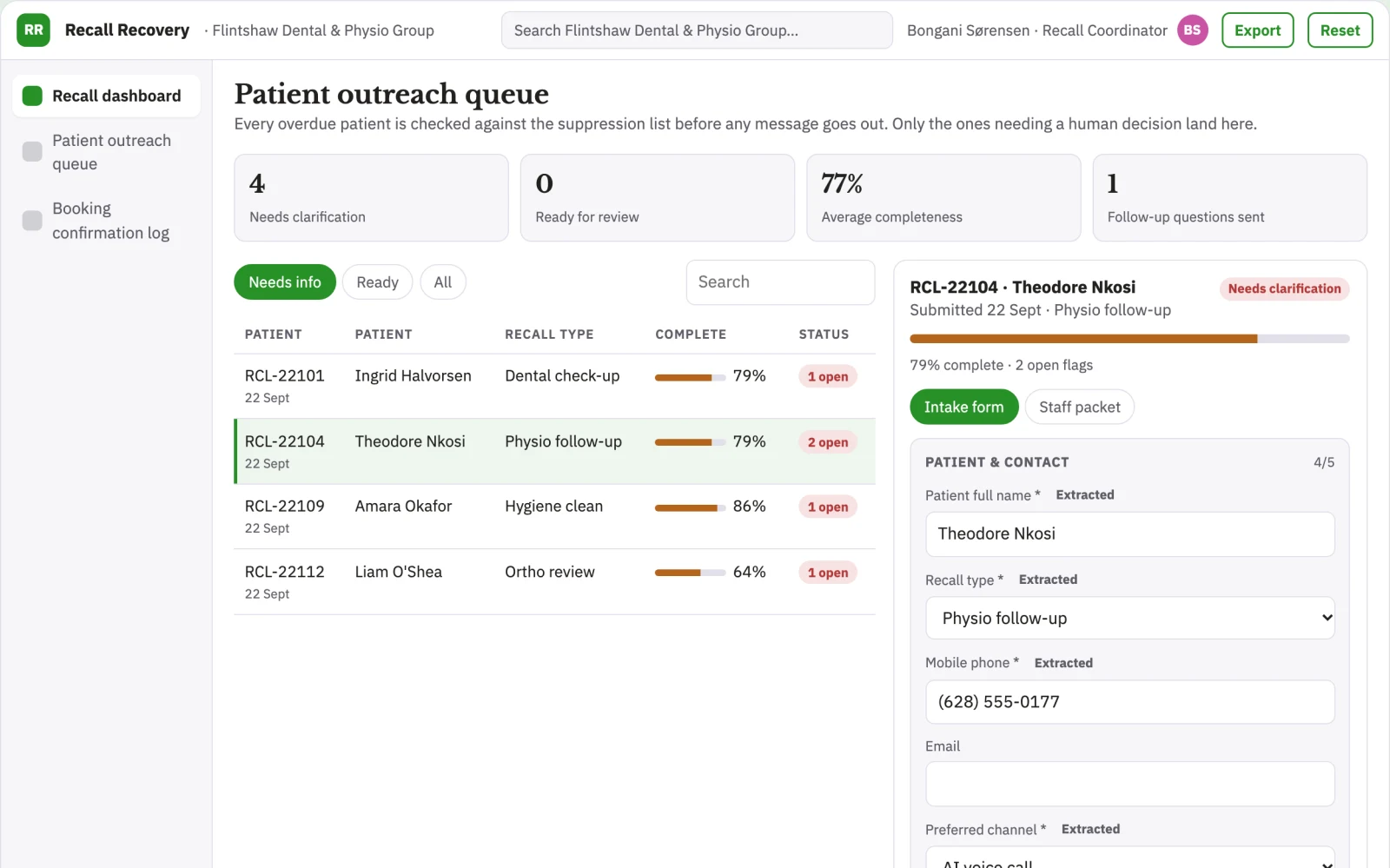
Key screens: Recall dashboard, patient outreach queue, booking confirmation log. Use a dashboard showing overdue counts by type and channel, a queue of patients with contact preference and suppression flags, and a log of AI conversations and bookings. Let staff filter by appointment type and date. Display outreach status: sent, replied, booked, declined, flagged. Provide a single-click approval for AI-proposed bookings. In this product, the first view is recall dashboard, followed by patient outreach queue and booking confirmation log.
Accounts and administration
Clinic-level accounts, staff roles for review and sign-off, message templates, suppression list management, booking audit trail, opt-out records and a full conversation log for compliance.
Integrations and data access
Practice management systems such as Dentrix or Exact, SMS and email providers, and the clinic's live appointment calendar.
How we build it
We build with our own AI software development factory, so most implementations take days to a few weeks of creation time, not months. You see working software at every step, and exact timing depends on availability.
- 1
Scoping call
Day 1Thirty minutes on your process, your data and how you want to run it: for your own team, or for your clients. You get a fixed scope and price for the MVP.
- 2
MVP
5 daysOne buyer segment, one recurring use case. Manual review in the loop. Built by our AI software factory.
- 3
Paid pilot
6 daysAccounts, roles, review states, audit trail and the first integration, hardened for two to three paying pilot customers.
- 4
Full product
10 daysSelf-serve onboarding, billing, monitoring and the wider integration set.
- 5
Run and improve
MonthlyWe host, monitor and improve it for a fixed monthly fee, or hand it over to your team. How the retainer works.
Why we start with an MVP
An MVP, or minimum viable product, is the smallest version that your users can actually work with. It is not a cheap version of the full solution. It is a test, built to answer the questions that decide whether the rest is worth building.
- Pick the riskiest assumption. Here: will practice managers at private dental and physiotherapy clinics use it to solve "overdue patient recall lists are long, full of dead numbers, and rarely get fully worked through, so clinics miss care and revenue"?
- Build only what tests it. One team, one use case, a few core modules. People do the rest by hand for now.
- Run a paid pilot. A four-week paid pilot at one clinic proves it by comparing the conversion rate of the AI-worked list against the prior quarter's manual recall conversion.
- Measure, then decide. Track recall list conversion rate and number of bookings made without staff phone calls. Then expand, change course or stop, with evidence instead of opinions.
MVP scope for this solution. One dental clinic, one appointment type such as six-month check, SMS and email only, fixed slot set, and manual review of every booking before commit.
After the MVP. Add AI voice calls, multiple appointment types, automatic follow-up scheduling for declined patients, and direct booking into the live calendar without manual review for low-risk cases.
What the build depends on. A reliable API for the practice management system, a suppression list data source, and a compliant messaging setup with opt-out handling.
Investment
A planning range to start the conversation, not a quote. You pay per phase, so you can stop after the MVP.
- Phase 1
MVP
One buyer segment, one recurring use case. Manual review in the loop.
- Phase 2
Paid pilot
Accounts, roles, review states, audit trail and the first integration, hardened for two to three paying pilot customers.
- Phase 3
Full product
Self-serve onboarding, billing, monitoring and the wider integration set.
Indicative total, MVP to full product$32,500about 4 weeks of creation time · start with the MVP from $8,500
Running costs per month
A rough indication of monthly hosting and AI model costs once it is live, not tested. Real costs depend on usage, file sizes and the models chosen.
| Stage | Hosting and infrastructure | AI usage | Total per month |
|---|---|---|---|
| MVP and paid pilotabout 3 customers | $50–$100 | $40–$90 | $90–$190 |
| Full productabout 50 customers | $190–$380 | $280–$560 | $470–$940 |
Run it or resell it
For your own team
Practice managers at private dental and physiotherapy clinics run it inside the business: overdue recall list, patient contact preferences, live appointment calendar, suppression list in, booked appointments, daily staff summary, flagged conversation log out, reviewed by your people.
As part of your offer
Agencies, consultancies and software companies can offer it to their own clients under their brand. We build and maintain it; you sell and deliver it.
Your brand, or this one
Run it under your own brand, or start from this concept style.
- primary
#279128 - accent
#c954a4 - surface
#e4f1e5 - ink
#22201e
- Headings
- Libre Baskerville
- Text
- IBM Plex Sans
- Voice
- Careful, kind, clinically plain
Selling it to your own clients: the go-to-market playbook
Pricing to test
Test at USD 300 per clinic per month, plus a small per-booking fee of USD 2, as a hypothesis.
Message to test
Turn your overdue recall list into booked appointments while your team sleeps.
Where to find buyers
Dental and physio practice manager forums, industry conferences, and direct outreach to clinic owners via LinkedIn and email.
Lead magnet
A free two-week trial on one appointment type, showing the conversion rate on your own recall list.
The first 30 days
- Week 1: Connect to one practice management system and build the recall trigger.
- Week 2: Build the suppression list and message templates.
- Week 3: Run SMS and email outreach with manual booking review.
- Week 4: Test with the pilot clinic and refine the daily summary.
Paid pilot
A four-week paid pilot at one clinic proves it by comparing the conversion rate of the AI-worked list against the prior quarter's manual recall conversion. The decision to continue is based on at least a 20% increase in booked recall appointments with no compliance incidents.
Success metrics
Recall list conversion rate and number of bookings made without staff phone calls.
Retention and expansion
The system keeps working nightly with no staff effort, and each month it learns better phrasing and timing, so the clinic sees compounding recall revenue and stays because the alternative is a guilt pile again.
Why clients would pick it
The more clinics use it, the better the AI gets at phrasing, timing and handling edge cases, and the suppression and compliance rules become a benchmark competitors cannot match without the same accumulated data.
Alternatives and positioning
Receptionists manually calling down a printed recall list on a quiet Friday. This differs by working the whole list overnight, across channels, and booking straight into the calendar.
Main delivery costs
Practice management system integration, AI conversation minutes, SMS and email sending, and support time for setup and troubleshooting.
Safeguards
Strict suppression list enforced before any contact, opt-out on every message, human review of all bookings and flagged replies, role-based permissions, and a rule that the AI must never contact a patient on a suppression list or make a booking without staff approval in the pilot phase.