LAN Party Coordination Suite
A single system that pre-checks hardware, licences, and network config before the event, then auto-detects and patches issues live, so the host only plugs in and plays.
- For
- Event hosts and HR managers organising small group gaming events
- Solves
- Organising a LAN party means weeks of back-and-forth about hardware, game licences, and network setup, with one missing cable or driver stalling the night.
- Delivers
- Pre-configured network setup file, reserved hardware kit, live monitoring dashboard, troubleshooting assistant
- Built in
- 10 days of creation time, MVP in 2 days
- Investment
- $5,500 for the MVP, $16,500 for the full product
- Run it
- Inside your business, or as part of your offer to clients
What it does
For event hosts and HR managers organising small group gaming events, turn a date, player list, and game preferences into a pre-configured network setup, reserved hardware, and a live troubleshooting assistant.
- Book an event with date, player count, and preferred games.
- Check hardware inventory and reserve kit.
- Verify game licences across player accounts via API.
- Generate a pre-configured network setup file.
- Auto-detect devices and patch drivers on the day.
- Rebalance teams or spawn AI bots if a player drops out.
What goes in, what comes out
- Event date
- Player count
- Preferred games
- Player account IDs

AI drafts, people review. Operational coordination portal.
- Pre-configured network setup file
- Reserved hardware kit
- Live monitoring dashboard
- Troubleshooting assistant
How it works
The workflow
- InStart with
Event date, player count, preferred games, player account IDs
- 1
Book a date
- 2
Select player count and games
- 3
Cross-check hardware inventory
- 4
Verify licences
- 5
Generate network config
- 6
Guide physical setup
- 7
Monitor live stability
- OutFinish with
Pre-configured network setup file, reserved hardware kit, live monitoring dashboard, troubleshooting assistant
AI does the heavy lifting, people stay in charge
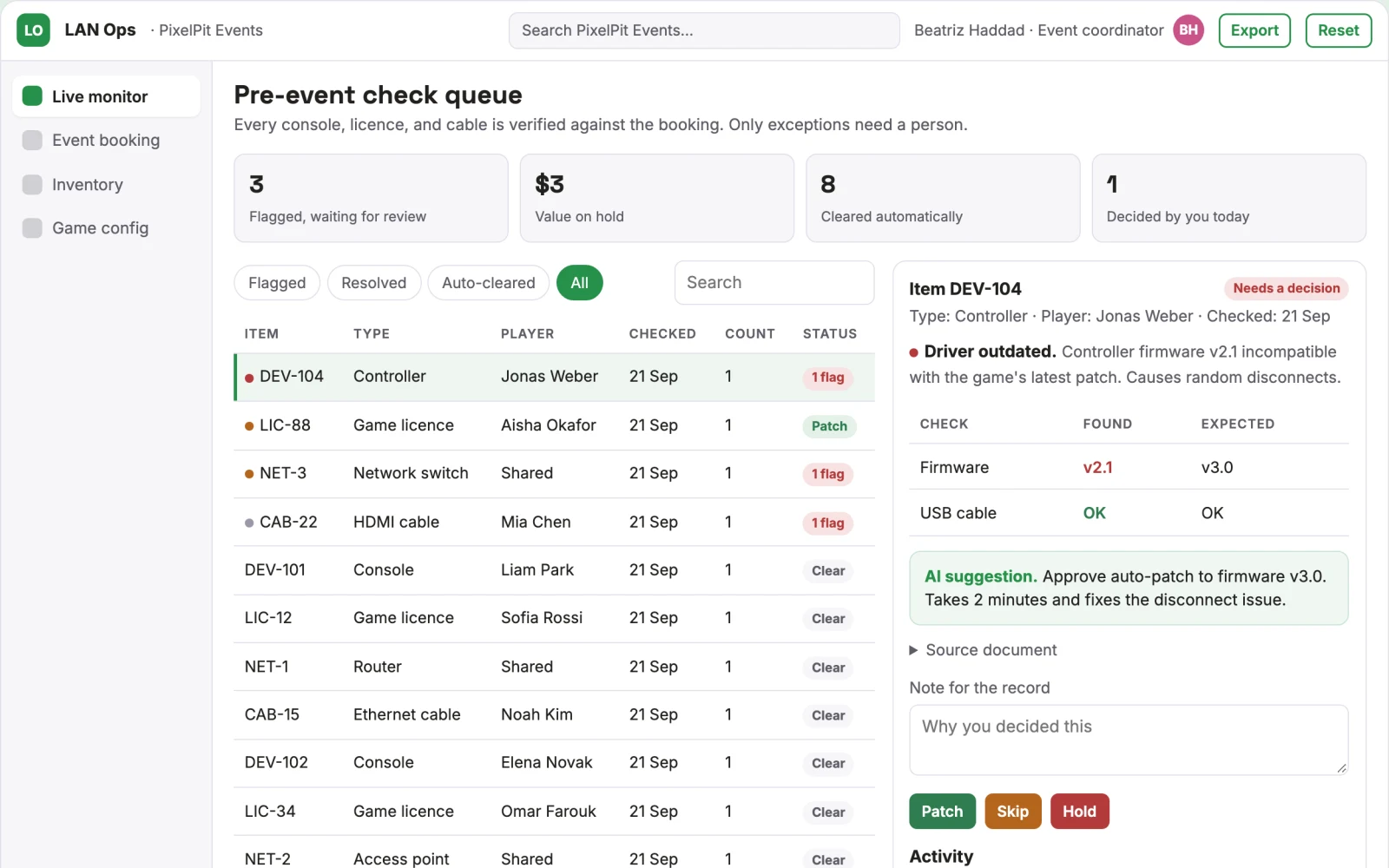
Use language models to interpret booking requests and generate setup instructions, and rule-based agents to cross-check inventory and licences. Use voice models for the on-day assistant. A human host confirms physical setup and reviews any driver patches before play starts.
What your team sees
Key screens: Event booking, inventory check, game config, live monitor. Use a booking form for date, player count, and games, then an inventory dashboard showing reserved hardware and gaps. Provide a game config screen with licence checks and pre-load status. On the day, a live monitor shows network health, device detection, and driver patches. In this product, the first view is event booking, followed by inventory check, game config, and live monitor.
Accounts and administration
Event ownership, player roles, hardware reservations, config versions, approval states, audit trail of licence checks and patches, and a record of physical kit condition.
Integrations and data access
Steam or console APIs for game licences, router configuration interfaces, hardware diagnostic tools, and a simple booking calendar.
How we build it
We build with our own AI software development factory, so most implementations take days to a few weeks of creation time, not months. You see working software at every step, and exact timing depends on availability.
- 1
Scoping call
Day 1Thirty minutes on your process, your data and how you want to run it: for your own team, or for your clients. You get a fixed scope and price for the MVP.
- 2
MVP
2 daysOne buyer segment, one recurring use case; first modules: booking and inventory check, plus game config. Manual review in the loop. Built by our AI software factory.
- 3
Paid pilot
3 daysAccounts, roles, review states, audit trail and the first integration, hardened for two to three paying pilot customers.
- 4
Full product
5 daysSelf-serve onboarding, billing, monitoring and the wider integration set.
- 5
Run and improve
MonthlyWe host, monitor and improve it for a fixed monthly fee, or hand it over to your team. How the retainer works.
Why we start with an MVP
An MVP, or minimum viable product, is the smallest version that your users can actually work with. It is not a cheap version of the full solution. It is a test, built to answer the questions that decide whether the rest is worth building.
- Pick the riskiest assumption. Here: will event hosts and HR managers organising small group gaming events use it to solve "organising a LAN party means weeks of back-and-forth about hardware, game licences, and network setup, with one missing cable or driver stalling the night"?
- Build only what tests it. One team, one use case, a few core modules. People do the rest by hand for now.
- Run a paid pilot. Run a paid pilot with five friend groups, measuring setup time and number of support calls versus their previous manual process.
- Measure, then decide. Track average setup time reduced from 3 hours to under 1 hour; percentage of events with zero technical stalls during play. Then expand, change course or stop, with evidence instead of opinions.
MVP scope for this solution. One buyer: small friend groups. One use case: Counter-Strike 2 with a fixed hardware kit of identical laptops and a pre-configured router. First two modules: booking and inventory check, plus game config. Manual review of licences and setup card before the event.
After the MVP. Automate licence verification across more titles, add voice assistant for on-day troubleshooting, integrate with hardware diagnostics for predictive maintenance, and offer corporate team-building packages with custom branding.
What the build depends on. Access to game library APIs, reliable cloud inference for agents, a logistics partner or local depot for hardware, and a standardised hardware kit.
Investment
A planning range to start the conversation, not a quote. You pay per phase, so you can stop after the MVP.
- Phase 1
MVP
One buyer segment, one recurring use case; first modules: booking and inventory check, plus game config. Manual review in the loop.
- Phase 2
Paid pilot
Accounts, roles, review states, audit trail and the first integration, hardened for two to three paying pilot customers.
- Phase 3
Full product
Self-serve onboarding, billing, monitoring and the wider integration set.
Indicative total, MVP to full product$16,50010 days of creation time · start with the MVP from $5,500
Running costs per month
A rough indication of monthly hosting and AI model costs once it is live, not tested. Real costs depend on usage, file sizes and the models chosen.
| Stage | Hosting and infrastructure | AI usage | Total per month |
|---|---|---|---|
| MVP and paid pilotabout 3 customers | $30–$60 | $40–$90 | $70–$150 |
| Full productabout 50 customers | $110–$210 | $280–$560 | $390–$770 |
Run it or resell it
For your own team
Event hosts and HR managers organising small group gaming events run it inside the business: event date, player count, preferred games, player account IDs in, pre-configured network setup file, reserved hardware kit, live monitoring dashboard, troubleshooting assistant out, reviewed by your people.
As part of your offer
Agencies, consultancies and software companies can offer it to their own clients under their brand. We build and maintain it; you sell and deliver it.
Your brand, or this one
Run it under your own brand, or start from this concept style.
- primary
#27914a - accent
#c95489 - surface
#e4f1e9 - ink
#22201e
- Headings
- Space Grotesk
- Text
- Inter
- Voice
- Welcoming, lively, attentive
Selling it to your own clients: the go-to-market playbook
Pricing to test
Test pricing at $150 per event for up to 8 players, $250 for up to 16, with corporate packages at $500 including setup support.
Message to test
Book the date, we handle the rest: hardware, network, and game config sorted by AI.
Where to find buyers
Gaming community forums, social media groups for LAN enthusiasts, HR event planning platforms, and corporate team-building agencies.
Lead magnet
A free demo showing a sample event setup with a simulated inventory check and network config for Counter-Strike 2.
The first 30 days
- Week 1: Build booking page and inventory check module.
- Week 2: Integrate game licence API for one title and generate network config.
- Week 3: Test with a fixed hardware kit and printed setup card.
- Week 4: Run a live pilot with one friend group and collect feedback.
Paid pilot
Run a paid pilot with five friend groups, measuring setup time and number of support calls versus their previous manual process. Baseline is 3 hours of setup and 2 support calls; success is under 1 hour and zero calls. Decision to expand if 4 of 5 groups rebook.
Success metrics
Average setup time reduced from 3 hours to under 1 hour; percentage of events with zero technical stalls during play.
Retention and expansion
Offer a subscription for recurring events with hardware maintenance and priority support, plus add-on services like custom game configs or corporate branding.
Why clients would pick it
Each event logs hardware health, licence states, and network behaviour, building a dataset that improves predictive maintenance and config accuracy, making the service more reliable and harder to replicate.
Alternatives and positioning
People use spreadsheets, group chats, and manual router setup today. This differs by automating the coordination layer and providing live, AI-driven troubleshooting instead of relying on one tech-savvy friend.
Main delivery costs
Hardware rental or purchase, shipping between events, cloud inference for AI agents, API access to game libraries, and support staff for physical logistics.
Safeguards
Limit booking to a fixed hardware kit and supported games, require host confirmation of physical setup, log all licence checks and patches, and never auto-install software without host approval. It must not access player accounts beyond licence verification.