Supplier Price Watch
Supplier price changes caught in messy documents and checked against what you actually buy.
- For
- Operations and procurement managers at mid-sized restaurants, distributors and trade contractors
- Solves
- Supplier price creep hides in line items, delivery fees and surcharge notes, and by the time anyone notices, the next order has already gone out at a higher rate.
- Delivers
- Weekly price-change briefing with flagged increases, source links and approved reorder or switch recommendations
- Built in
- 10 days of creation time, MVP in 2 days
- Investment
- $5,000 for the MVP, $15,500 for the full product
- Run it
- Inside your business, or as part of your offer to clients
What it does
For operations and procurement managers at mid-sized restaurants, distributors and trade contractors, turn supplier price lists, invoices and emails into a flagged price-change briefing with reorder or switch recommendations.
- Connect supplier inboxes and price lists.
- Extract line items, unit costs, fees and effective dates.
- Match supplier descriptions to catalogue items.
- Flag increases above a set threshold.
- Show old and new prices with source links.
- Draft reorder or switch recommendations for approval.
What goes in, what comes out
- Supplier price lists
- Invoices
- Emails
- Purchase history

AI drafts, people review. Watchlist, change detection and briefing subscription.
- Weekly price-change briefing with flagged increases
- Source links
- Approved reorder or switch recommendations
How it works
The workflow
- InStart with
Supplier price lists, invoices, emails and purchase history
- 1
Connect supplier inboxes and purchase history
- 2
Extract line items and fees
- 3
Match to catalogue
- 4
Flag increases above threshold
- 5
Review recommendations
- 6
Approve or reject
- 7
Log the decision
- OutFinish with
Weekly price-change briefing with flagged increases, source links and approved reorder or switch recommendations
AI does the heavy lifting, people stay in charge
Use language models to read unstructured PDFs, spreadsheets and emails, extract line items and fees, and match supplier descriptions to catalogue items. A buyer reviews every flagged change and recommendation before anything is sent; the system never places an order or contacts a supplier without human approval.
What your team sees
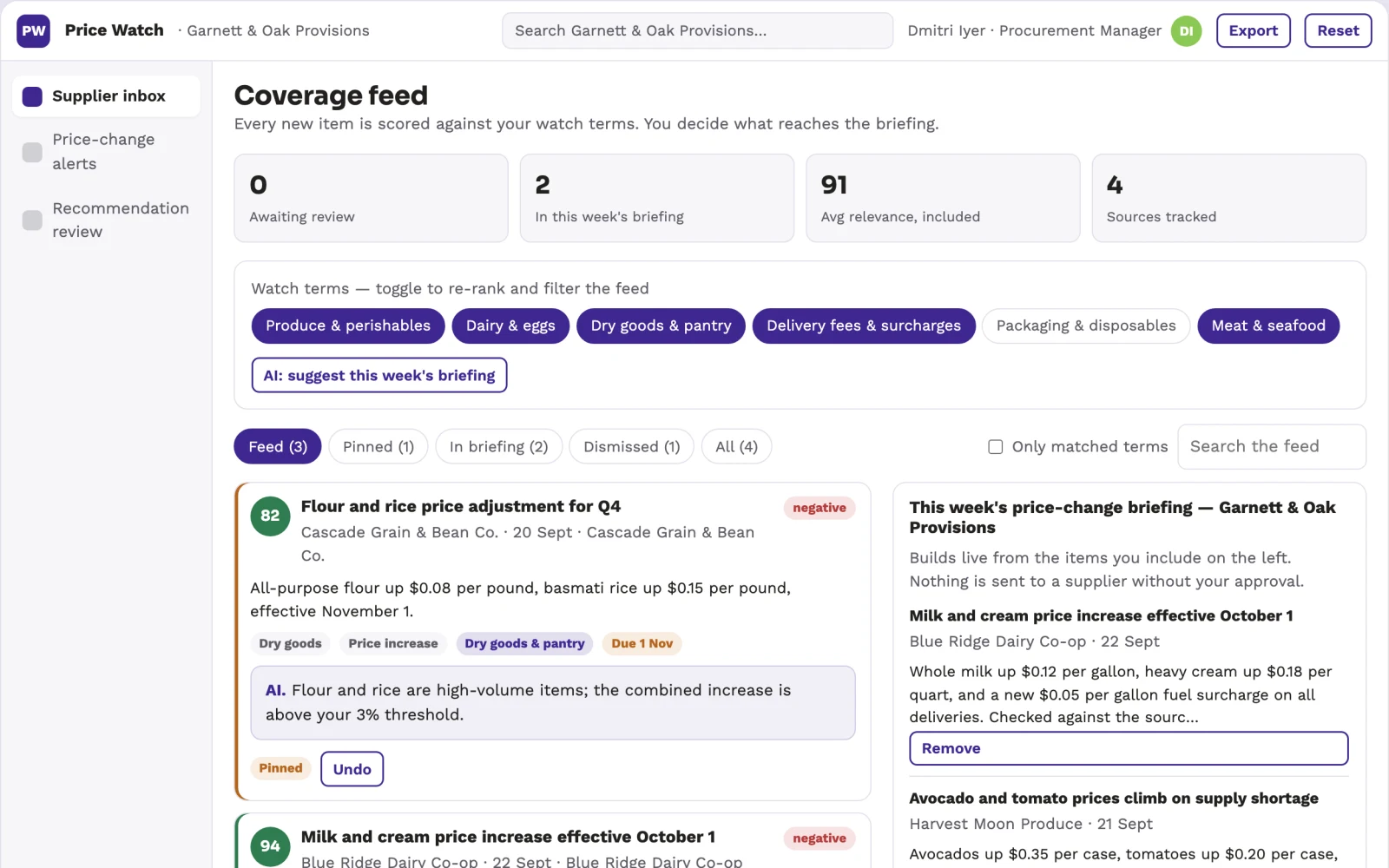
Key screens: Supplier inbox, price-change alerts, recommendation review. Use a dashboard for alerts with a filterable list of flagged changes, a detail panel showing old versus new prices side by side with source document links, and a review queue where buyers approve or reject recommendations. Display product, supplier, effective date and threshold status. Provide a weekly digest email with a simple approve or ignore button. In this product, the first view is supplier inbox, followed by price-change alerts and recommendation review.
Accounts and administration
User roles for buyers and managers, supplier and product match overrides, threshold rules, approval history, audit trail of all recommendations and decisions, and versioned source documents.
Integrations and data access
Email inboxes (Gmail, Outlook), PDF and spreadsheet storage (Google Drive, Dropbox), basic purchase history exports (CSV), and later purchase order systems.
How we build it
We build with our own AI software development factory, so most implementations take days to a few weeks of creation time, not months. You see working software at every step, and exact timing depends on availability.
- 1
Scoping call
Day 1Thirty minutes on your process, your data and how you want to run it: for your own team, or for your clients. You get a fixed scope and price for the MVP.
- 2
MVP
2 daysOne buyer segment, one recurring use case; first modules: extraction and flagging. Manual review in the loop. Built by our AI software factory.
- 3
Paid pilot
3 daysAccounts, roles, review states, audit trail and the first integration, hardened for two to three paying pilot customers.
- 4
Full product
5 daysSelf-serve onboarding, billing, monitoring and the wider integration set.
- 5
Run and improve
MonthlyWe host, monitor and improve it for a fixed monthly fee, or hand it over to your team. How the retainer works.
Why we start with an MVP
An MVP, or minimum viable product, is the smallest version that your users can actually work with. It is not a cheap version of the full solution. It is a test, built to answer the questions that decide whether the rest is worth building.
- Pick the riskiest assumption. Here: will operations and procurement managers at mid-sized restaurants, distributors and trade contractors use it to solve "supplier price creep hides in line items, delivery fees and surcharge notes, and by the time anyone notices, the next order has already gone out at a higher rate"?
- Build only what tests it. One team, one use case, a few core modules. People do the rest by hand for now.
- Run a paid pilot. Paid pilot with one client, one supplier, and one category.
- Measure, then decide. Track number of price increases caught before order placement; time saved per buyer per week on price checking. Then expand, change course or stop, with evidence instead of opinions.
MVP scope for this solution. One buyer, one supplier connection, one product category, and two modules: extraction and flagging. Manual review of all matches and recommendations before any action.
After the MVP. Automate match confirmations after initial human feedback, add automatic reorder drafting, integrate with purchase order systems, and expand to all suppliers and categories.
What the build depends on. Access to supplier inboxes and purchase history, OCR for handwritten or scanned documents, and a reliable matching model for product descriptions.
Investment
A planning range to start the conversation, not a quote. You pay per phase, so you can stop after the MVP.
- Phase 1
MVP
One buyer segment, one recurring use case; first modules: extraction and flagging. Manual review in the loop.
- Phase 2
Paid pilot
Accounts, roles, review states, audit trail and the first integration, hardened for two to three paying pilot customers.
- Phase 3
Full product
Self-serve onboarding, billing, monitoring and the wider integration set.
Indicative total, MVP to full product$15,50010 days of creation time · start with the MVP from $5,000
Running costs per month
A rough indication of monthly hosting and AI model costs once it is live, not tested. Real costs depend on usage, file sizes and the models chosen.
| Stage | Hosting and infrastructure | AI usage | Total per month |
|---|---|---|---|
| MVP and paid pilotabout 3 customers | $30–$60 | $50–$100 | $80–$160 |
| Full productabout 50 customers | $110–$210 | $350–$700 | $460–$910 |
Run it or resell it
For your own team
Operations and procurement managers at mid-sized restaurants, distributors and trade contractors run it inside the business: supplier price lists, invoices, emails and purchase history in, weekly price-change briefing with flagged increases, source links and approved reorder or switch recommendations out, reviewed by your people.
As part of your offer
Agencies, consultancies and software companies can offer it to their own clients under their brand. We build and maintain it; you sell and deliver it.
Your brand, or this one
Run it under your own brand, or start from this concept style.
- primary
#3e2791 - accent
#8bc954 - surface
#e7e4f1 - ink
#22201e
- Headings
- Sora
- Text
- Work Sans
- Voice
- Calm, reliable, step-by-step
Selling it to your own clients: the go-to-market playbook
Pricing to test
Test pricing at $299 per month per buyer, with a setup fee of $1,500 for initial supplier connections and catalogue matching.
Message to test
Never overpay a supplier again: get a weekly watch on every price change, with a clear recommendation before you order.
Where to find buyers
LinkedIn ads targeting procurement managers, industry trade shows for distributors, and direct outreach to operations managers in target verticals.
Lead magnet
Free price-creep audit: we review one supplier's invoices and price lists and show you where you overpaid last quarter.
The first 30 days
- Week 1: Build extraction pipeline for one supplier's PDFs and emails.
- Week 2: Match line items to a sample catalogue and set threshold rules.
- Week 3: Deliver weekly digest with flagged changes and source links.
- Week 4: Refine matching with client feedback and prepare for pilot expansion.
Paid pilot
Paid pilot with one client, one supplier, and one category. Baseline: current time spent on manual price checks and number of missed increases. Decision: if the pilot catches at least three price increases and saves two hours per week, proceed to broader rollout.
Success metrics
Number of price increases caught before order placement; time saved per buyer per week on price checking.
Retention and expansion
The system becomes the buyer's default watch on supplier changes; as more history and matches accumulate, the switching cost rises and the service becomes embedded in the procurement routine.
Why clients would pick it
The more supplier documents and purchase histories it processes, the better the matching model becomes, and the switch cost of moving to a new tool grows with every confirmed match and saved order.
Alternatives and positioning
Manual spreadsheet comparison, paper invoice review, or e-procurement tools that expect clean catalogue data. This differs by handling messy formats and linking directly to your spend.
Main delivery costs
Main delivery costs are LLM API usage for document parsing, data storage, and a human-in-the-loop reviewer for the first weeks of each client.
Safeguards
Buyer approval required for any recommendation; read-only access to supplier documents; no automated ordering; permission levels for viewing vs. approving; audit trail of all changes and decisions; must not send communications to suppliers without explicit buyer action.