Automated Charity Enquiry Inbox
A specialised inbox solution that understands the specific context of non-profit operations and volunteer management.
- For
- Operations managers at small charities
- Solves
- A shared inbox fills with repetitive questions and spam, causing staff to miss volunteer enquiries and waste time on triage.
- Delivers
- Categorised email logs, automated replies for routine queries, and drafted responses for complex queries ready for review.
- Built in
- about 3 weeks of creation time, MVP in 3 days
- Investment
- $6,000 for the MVP, $19,500 for the full product
- Run it
- Inside your business, or as part of your offer to clients
What it does
For operations managers at small charities, turn incoming emails into categorised interactions and sent replies, and the problem it addresses is staff burnout caused by overflowing inboxes.
- Classify incoming messages by type.
- Generate instant replies from approved templates.
- Personalise replies with sender details.
- Draft complex messages for human review.
- Log all interactions in a CRM or spreadsheet.
- Flag urgent enquiries for immediate attention.
What goes in, what comes out
- Approved reply templates
- Email account credentials
- Classification rules
- Existing CRM or spreadsheet integration details

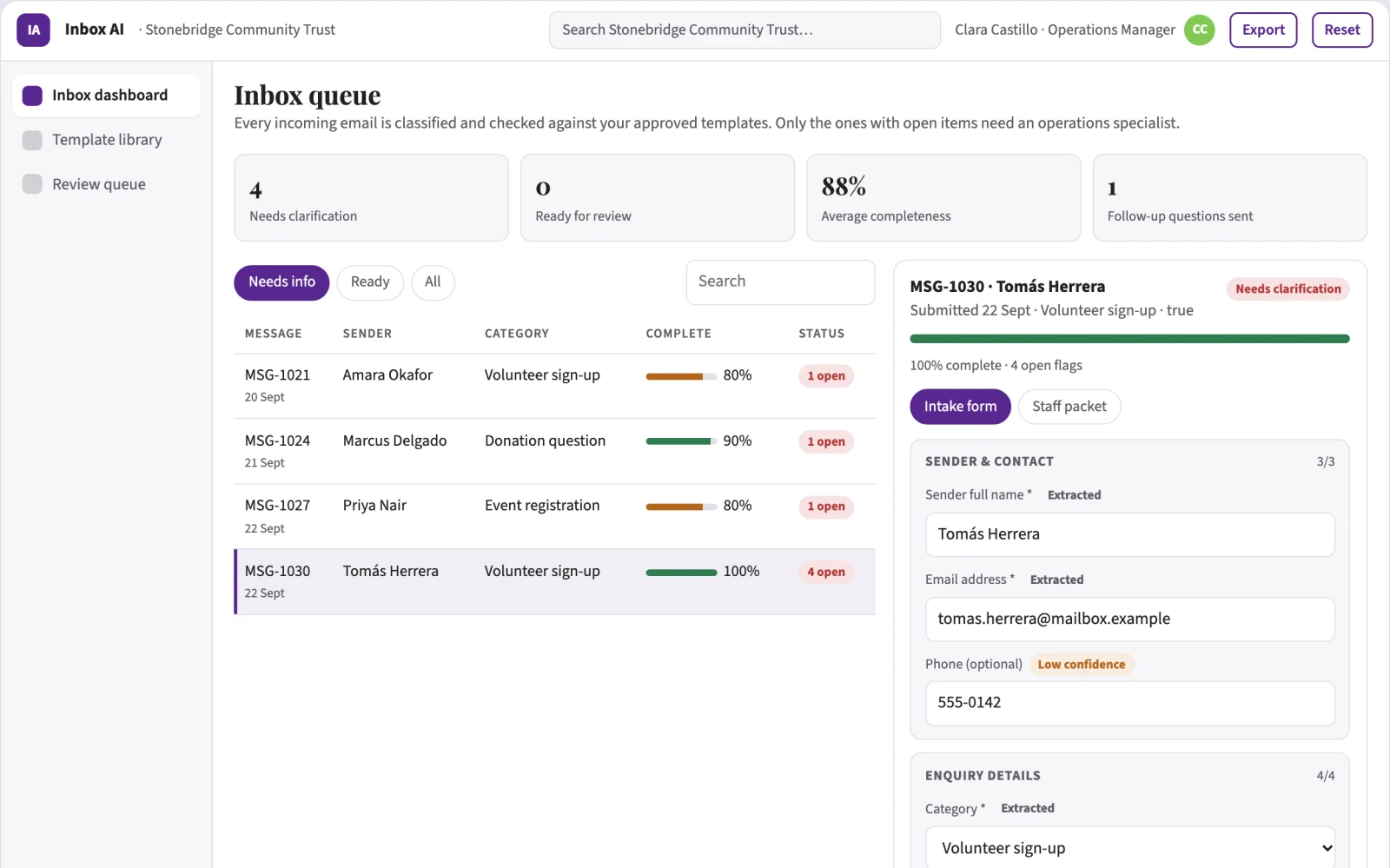
AI drafts, people review. Client intake portal and staff exception queue.
- Categorised email logs
- Automated replies for routine queries
- Drafted responses for complex queries ready for review
How it works
The workflow
- InStart with
Approved reply templates, email account credentials, classification rules, and existing CRM or spreadsheet integration details.
- 1
Connect email account
- 2
Define classification rules
- 3
Upload approved reply templates
- 4
Review daily draft digest
- 5
Approve or edit drafts
- 6
Send approved replies
- 7
Log interaction history
- OutFinish with
Categorised email logs, automated replies for routine queries, and drafted responses for complex queries ready for review.
AI does the heavy lifting, people stay in charge
Use language models to read and classify emails and generate text from templates. A human must review and approve any message involving money or personal data before sending.
What your team sees
Key screens: Inbox dashboard, template library, review queue. Use a central dashboard showing email volume and categories, a template editor for approved replies, and a queue panel for drafts needing human review. Display status flags for urgent items. In this product, the first view is the dashboard, followed by the template library and review queue.
Accounts and administration
User roles for admins and reviewers, version history of templates, approval workflows for drafts, audit logs of all email interactions, and access controls for sensitive data.
Integrations and data access
Gmail or Outlook, Google Sheets or Excel, and existing CRM systems.
How we build it
We build with our own AI software development factory, so most implementations take days to a few weeks of creation time, not months. You see working software at every step, and exact timing depends on availability.
- 1
Scoping call
Day 1Thirty minutes on your process, your data and how you want to run it: for your own team, or for your clients. You get a fixed scope and price for the MVP.
- 2
MVP
3 daysOne buyer segment, one recurring use case. Manual review in the loop. Built by our AI software factory.
- 3
Paid pilot
4 daysAccounts, roles, review states, audit trail and the first integration, hardened for two to three paying pilot customers.
- 4
Full product
6 daysSelf-serve onboarding, billing, monitoring and the wider integration set.
- 5
Run and improve
MonthlyWe host, monitor and improve it for a fixed monthly fee, or hand it over to your team. How the retainer works.
Why we start with an MVP
An MVP, or minimum viable product, is the smallest version that your users can actually work with. It is not a cheap version of the full solution. It is a test, built to answer the questions that decide whether the rest is worth building.
- Pick the riskiest assumption. Here: will operations managers at small charities use it to solve "A shared inbox fills with repetitive questions and spam, causing staff to miss volunteer enquiries and waste time on triage"?
- Build only what tests it. One team, one use case, a few core modules. People do the rest by hand for now.
- Run a paid pilot. Compare the time spent on email triage before and after implementation, and measure the percentage of volunteer enquiries answered within 24 hours.
- Measure, then decide. Track hours saved per week on email triage and and increase in volunteer enquiry response rate. Then expand, change course or stop, with evidence instead of opinions.
MVP scope for this solution. One charity client, one shared email address, handling volunteer enquiries and donation receipts, with manual review of drafts.
After the MVP. Automated donation receipts, spam filtering, and integration with volunteer management software.
What the build depends on. Email API access, large language model integration, and secure data handling protocols.
Investment
A planning range to start the conversation, not a quote. You pay per phase, so you can stop after the MVP.
- Phase 1
MVP
One buyer segment, one recurring use case. Manual review in the loop.
- Phase 2
Paid pilot
Accounts, roles, review states, audit trail and the first integration, hardened for two to three paying pilot customers.
- Phase 3
Full product
Self-serve onboarding, billing, monitoring and the wider integration set.
Indicative total, MVP to full product$19,500about 3 weeks of creation time · start with the MVP from $6,000
Running costs per month
A rough indication of monthly hosting and AI model costs once it is live, not tested. Real costs depend on usage, file sizes and the models chosen.
| Stage | Hosting and infrastructure | AI usage | Total per month |
|---|---|---|---|
| MVP and paid pilotabout 3 customers | $30–$60 | $40–$90 | $70–$150 |
| Full productabout 50 customers | $110–$210 | $280–$560 | $390–$770 |
Run it or resell it
For your own team
Operations managers at small charities run it inside the business: approved reply templates, email account credentials, classification rules, and existing CRM or spreadsheet integration details. in, categorised email logs, automated replies for routine queries, and drafted responses for complex queries ready for review. out, reviewed by your people.
As part of your offer
Agencies, consultancies and software companies can offer it to their own clients under their brand. We build and maintain it; you sell and deliver it.
Your brand, or this one
Run it under your own brand, or start from this concept style.
- primary
#582791 - accent
#81c954 - surface
#eae4f1 - ink
#22201e
- Headings
- Playfair Display
- Text
- Source Sans 3
- Voice
- Calm, reliable, step-by-step
Selling it to your own clients: the go-to-market playbook
Pricing to test
$500 per month per shared inbox.
Message to test
Never miss a volunteer enquiry again with an inbox that sorts itself.
Where to find buyers
Charity networking events, non-profit directories, and social media groups.
Lead magnet
A free audit of your current email response times and volume.
The first 30 days
- Week 1: Connect to the shared inbox and map email types.
- Week 2: Build and approve the top five reply templates.
- Week 3: Launch the auto-reply and draft queue.
- Week 4: Review the daily digest and optimise the template library.
Paid pilot
Compare the time spent on email triage before and after implementation, and measure the percentage of volunteer enquiries answered within 24 hours.
Success metrics
Hours saved per week on email triage, and increase in volunteer enquiry response rate.
Retention and expansion
Recurring monthly fees based on inbox volume and template library expansion.
Why clients would pick it
Building a library of high-quality templates for non-profits and fine-tuning the AI on the specific language used in charity communications.
Alternatives and positioning
Manual email sorting, generic CRM auto-replies, and shared spreadsheets for tracking enquiries.
Main delivery costs
AI compute costs, template development time, and ongoing maintenance.
Safeguards
Strict rules preventing AI from sending messages without human approval, especially those involving money or personal data, and a manual override for any flagged content.